Understanding Claude Code
This document describes my interpretation of Claude Code's internal architecture, as inferred from examining the ~/.claude/ directory structure, debug logs, session transcripts, and configuration files. The statistics depend on usage patterns — the data analyzed here comes from extensive use across software development projects for designing, coding, consulting, debugging, and learning.
Note: Details such as models used, token limits, caching strategies, and plugin APIs may change over time.
Table of Contents
- High-Level Architecture
- Local Storage Layout
- Session Transcript Format
- Context Management and Prompt Caching
- Context Compaction (Summarization)
- Knowledge Sources
- CLAUDE.md and Cross-Session Memory
- Multi-Agent Architecture
- File History and Undo
- Message Queue
- Thinking Blocks and Signatures
- Shell Environment Snapshots
- Feature Flags (Statsig)
- End-to-End Flow: What Happens in a Turn
- Key Numbers
1. High-Level Architecture
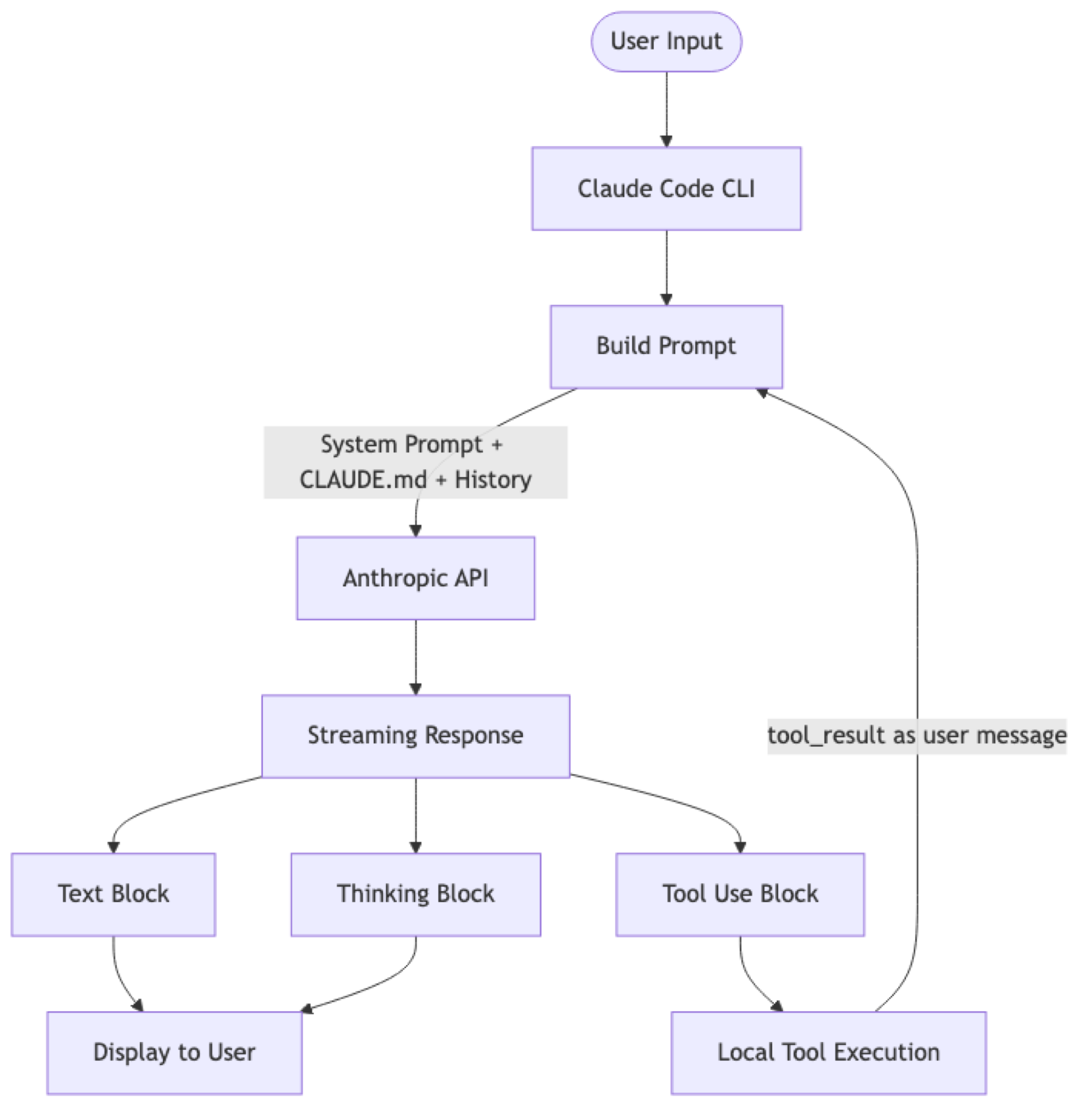
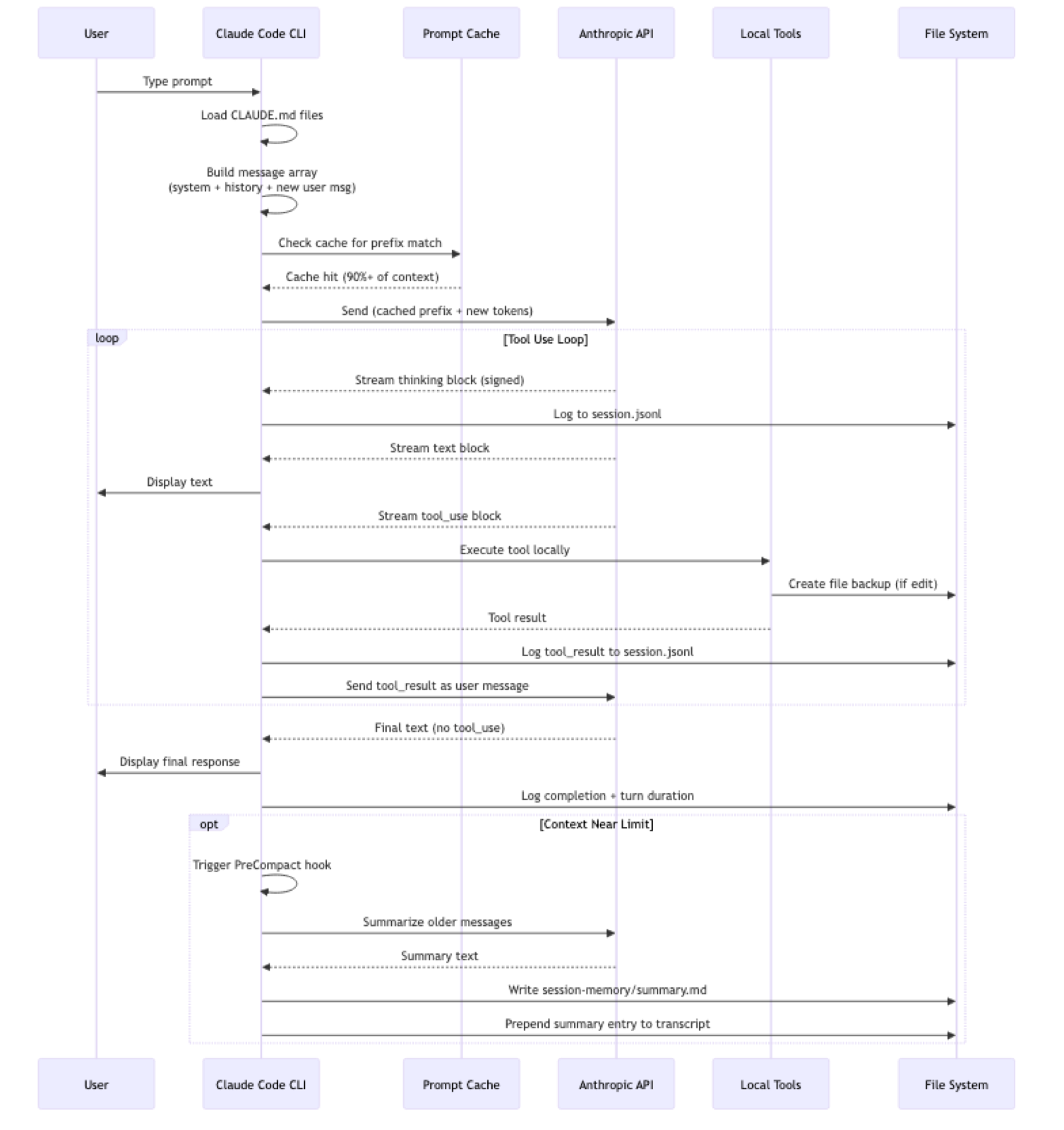
Claude Code is a stateless-per-turn, context-replay architecture. It has no persistent in-process memory. Every API call replays the conversation history (cached efficiently), and the model "remembers" only because it re-reads everything each turn.
Core Loop
- Assemble context: system prompt + CLAUDE.md files + conversation history + pending tool results
- API call with prompt caching (most of the context is a cache hit)
- Stream response: thinking block (signed), text block, tool_use blocks
- Execute tools locally (Read, Edit, Grep, Bash, etc.)
- Inject tool results as
usermessages (Anthropic API requires alternating roles) - Repeat until the model emits a text-only response (no more tool calls)
2. Local Storage Layout
~/.claude/
├── settings.json              # User config (plugins, thinking mode)
├── stats-cache.json           # Usage analytics (sessions, tokens, costs)
├── history.jsonl              # Global prompt history (all projects)
├── projects/                  # Per-project session data
│   └── -Users-kai-project/    # Path-encoded project directory
│       ├── sessions-index.json
│       ├── {session-id}.jsonl # Full session transcript
│       ├── tool-results/      # Externalized large tool outputs
│       ├── subagents/         # Sub-agent transcripts
│       └── session-memory/
│           └── summary.md     # Compaction summary (persistent)
├── file-history/              # File version backups for undo
│   └── {session-id}/
│       └── {hash}@v{n}        # Versioned file snapshots
├── plans/                     # Implementation plans (markdown)
├── todos/                     # Task lists per agent (JSON)
├── debug/                     # Session debug logs
├── shell-snapshots/           # Zsh/bash environment captures
├── plugins/                   # Plugin marketplace + installed plugins
│   ├── config.json
│   ├── installed_plugins.json
│   ├── known_marketplaces.json
│   ├── cache/                 # Installed plugin files
│   └── marketplaces/          # Official plugin registry
├── cache/                     # Changelog, metadata
├── statsig/                   # Feature flags (A/B testing)
├── paste-cache/               # Clipboard content cache
├── ide/                       # (reserved)
├── session-env/               # (reserved)
└── telemetry/                 # (reserved)
3. Session Transcript Format
Each session is a .jsonl file where every line is a JSON object. There are 7 entry types:
| Type | % of entries | Purpose |
|---|---|---|
progress |
~40% | Heartbeat timestamps (null message, 1/sec) |
assistant |
~32% | Model responses (thinking, text, tool_use) |
user |
~18% | User input + tool_result injections |
file-history-snapshot |
~4% | File backup metadata |
summary |
~2% | Compaction summaries |
system |
~2% | Turn durations, system events |
queue-operation |
<1% | Message queue management |
Message Linking
Messages form a linked list via parentUuid:

A single API response (same msg_id) is split into multiple JSONL records — one per content block (thinking, text, tool_use). This enables:
- Branching conversations (
isSidechain: truefor alternative paths) - Precise replay of conversation history
- Tree structures for exploring alternatives
Tool Result Injection
Tool results are wrapped as user messages to maintain the API's alternating role constraint:
{
  "type": "user",
  "message": {
    "role": "user",
    "content": [{"type": "tool_result", "tool_use_id": "toolu_01K8m..."}]
  },
  "sourceToolAssistantUUID": "0657cca8..."
}
Large Tool Output Externalization
When tool outputs are large, they're stored in separate files under tool-results/:
tool-results/
  toolu_011YSxxdb5gsLRRYN7Vfrh6C.txt    (49KB)
  toolu_013dzrmFDCBqsdZr3b88DT6V.txt    (38KB)
The JSONL transcript references these by tool_use_id, keeping the transcript queryable while offloading bulk data.
4. Context Management and Prompt Caching
Token Accounting
Every API response includes detailed cache metrics:
{
  "input_tokens": 10,
  "cache_creation_input_tokens": 8221,
  "cache_read_input_tokens": 10467,
  "cache_creation": {
    "ephemeral_5m_input_tokens": 8221,
    "ephemeral_1h_input_tokens": 0
  },
  "output_tokens": 3
}
Two cache tiers:
- 5-minute ephemeral cache: for rapidly changing content (recent conversation)
- 1-hour ephemeral cache: for stable content (system prompt, CLAUDE.md)
In observed sessions, cache read tokens vastly exceed new tokens — often 10:1 or higher. Example from stats: 1.19B cache read tokens vs 74.6M cache creation tokens for Opus.
Context Growth
Context grows ~1,000-5,000 tokens per turn. Debug logs show progression:
Summarizing all 5 messages   (~0 tokens)
Summarizing all 15 messages  (~1,746 tokens)
Summarizing all 53 messages  (~48,954 tokens)
Summarizing all 179 messages (~72,848 tokens)
Hard Limits
| Limit | Value |
|---|---|
| File read limit | 25,000 tokens per file |
| Auto tool search disabled | When remaining context < 50,000 chars |
| LSP diagnostics | Max 10 per file, 30 total |
5. Context Compaction (Summarization)
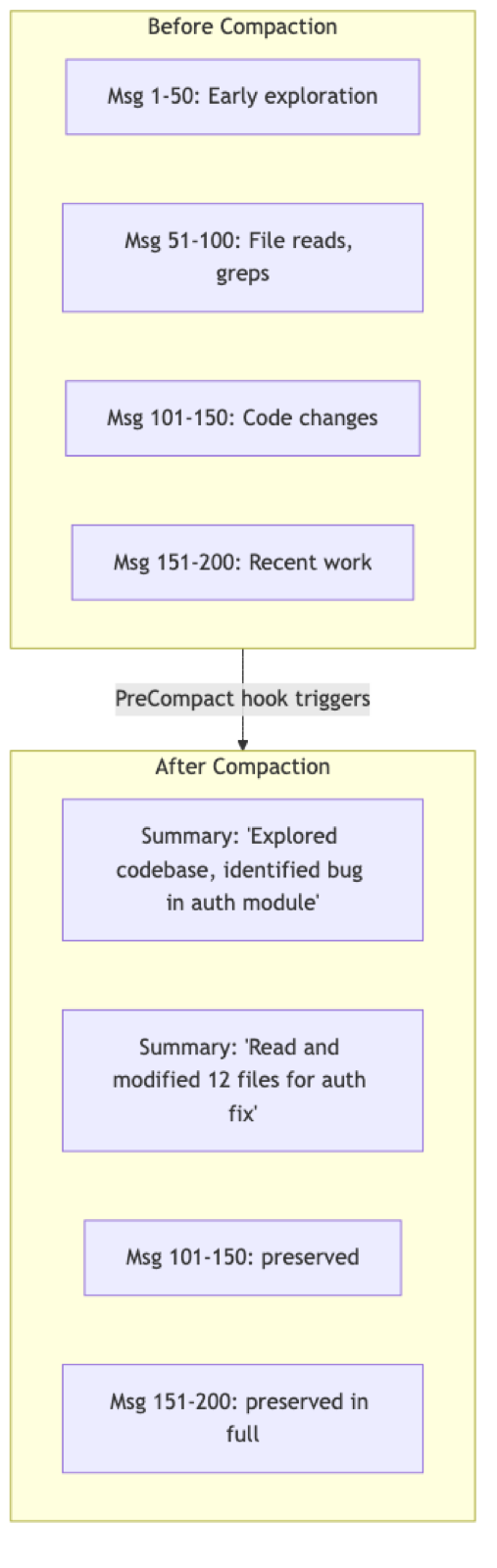
When context approaches the window limit, Claude Code runs compaction — the most critical mechanism for long sessions.
Two Compaction Strategies
From debug logs, two patterns are observed:
Full summarization:
"Summarizing all 276 messages (~148,468 tokens)"- Used when the entire context needs reduction
- Replaces everything with a summary + recent messages
Sliding window:
"Summarizing last 371 of 474 messages (~119,204 tokens)"- Keeps oldest context intact (may contain critical setup info)
- Summarizes a window of older messages while preserving recent ones
Summary Persistence
Summaries are written atomically to session-memory/summary.md. These files contain structured sections:
# Session Title: AIDA GUI Enhancement

## Current State
- Just completed: Cleaning up workbench/config/
- Open issue: instruments/agents folder is empty

## Key Files & Functions
- AIDA GUI: code/alfa/cmd/aida/main.go (~1118 lines)
- makeInstrumentsTree() - Shows workers/agents folder structure

## Tasks Completed
1. Added project menu (create, switch, rename, delete)
2. Added inspect tree with chronological AI requests/responses
...
Summary Entry in Transcript
After compaction, a summary entry replaces the compacted messages:
{"type":"summary","summary":"MyApp v2: Config Decoupling & Multi-Service Auth","leafUuid":"504bef43-..."}The leafUuid points to the last message of the compacted branch. In long sessions, multiple summaries stack at the beginning:
Line 1: {"type":"summary","summary":"MyApp Kafka: Topic Config Issues"}
Line 2: {"type":"summary","summary":"MyApp Kafka: Topic & ACL Analysis"}
Line 3: {"type":"summary","summary":"MyApp v2: Config, Decoupling, Beyond Kafka"}
...
Line 9: [actual messages start here]
What Survives Compaction
| Preserved | Lost/Degraded |
|---|---|
| Current task/goal | Full file contents (→ summaries) |
| File paths discovered | Thinking/reasoning chains |
| Key errors encountered | Failed attempts and dead ends |
| Decisions and rationale | Verbose grep/search results |
| Code changes applied | Exact line numbers from old reads |
| Recent N turns (full fidelity) | Nuanced discussion context |
| session-memory/summary.md | Intermediate search steps |
The Lossy Compression Problem
Compaction creates subtle bugs when the summarizer omits details needed later:
Session start:
  "The function uses a Manager receiver, not standalone"

... 100 turns later, after compaction ...

Claude: "Let me call containsSignificantContent(result)"
  // Forgot it needs m.containsSignificantContent()
  // Because the detailed grep output was compacted
What survives depends on what the summarizer deemed "important" — a judgment made without knowing future needs.
6. Knowledge Sources
On-Demand Discovery
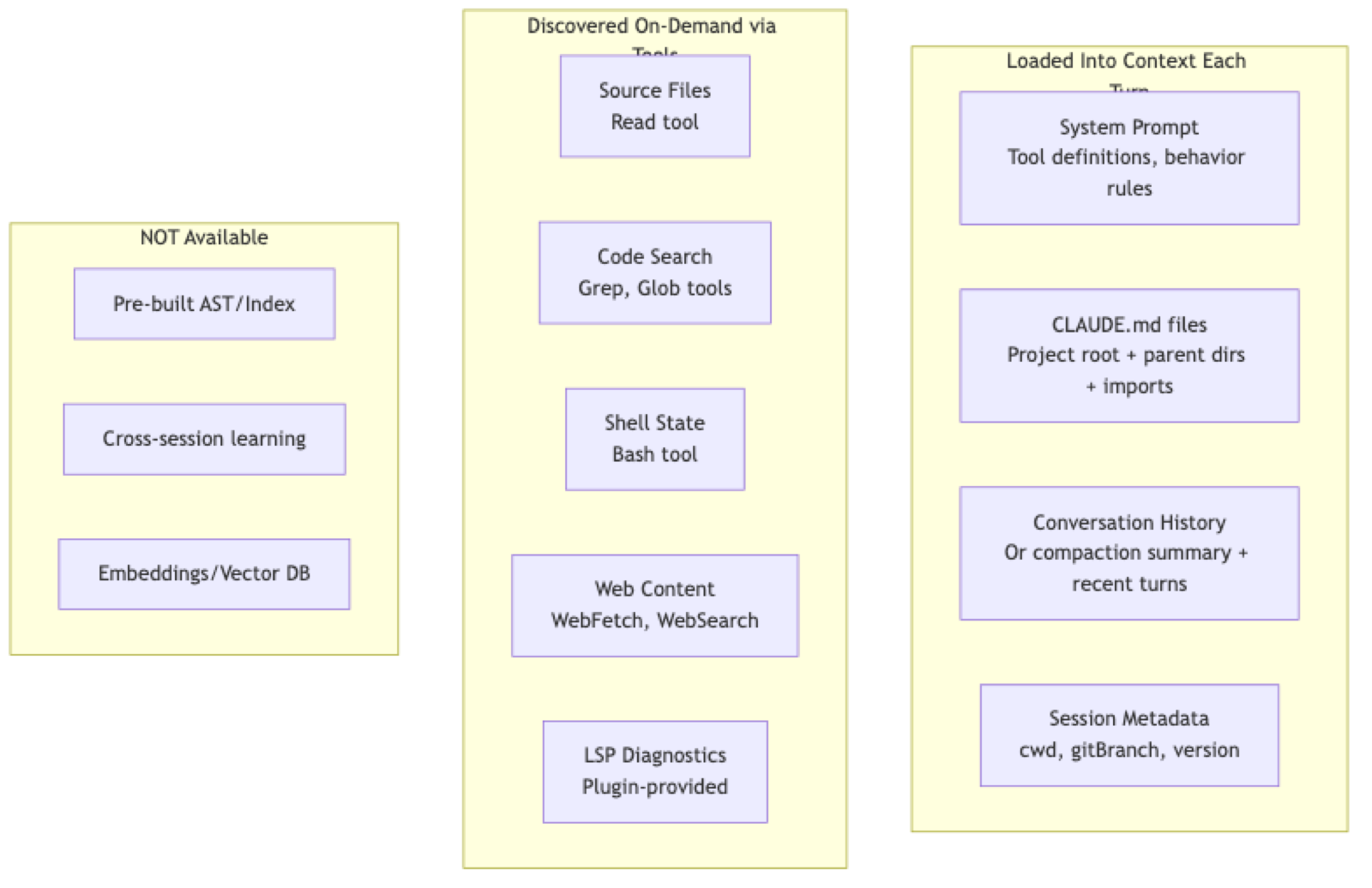
Claude Code doesn't pre-load project structure. It discovers through tools:
// Doesn't know where file is:
Read("/Users/kai/aidev/agen/memory_evaluator_test.go") → "File does not exist"

// Searches:
Glob("**/memory_evaluator_test.go") → finds actual path

// Reads to understand:
Grep("containsSignificantContent", path) → discovers it's a method
The model builds understanding incrementally through exploration, not from a pre-indexed knowledge base.
What Claude Code Does NOT Have
| Feature | Status |
|---|---|
| Project summary | Not pre-built, discovered on demand |
| Task/goal tracking | Per-session via todos/ only |
| File index/AST | On-demand only |
| Persistent memory | No cross-session learning |
| Learned patterns | Per-conversation only |
7. CLAUDE.md and Cross-Session Memory
CLAUDE.md files are the primary mechanism for project-specific knowledge persistence.
File Hierarchy
CLAUDE.md is a layered hierarchy loaded in order:
~/.claude/CLAUDE.md              # Global defaults (all projects)
./CLAUDE.md                      # Project root (team-shared, in git)
./.claude.local.md               # Personal overrides (gitignored)
./packages/*/CLAUDE.md           # Monorepo package-specific
./subdir/CLAUDE.md               # Feature or domain-specific
Files support @include directives to import external files, with an approval dialog for imports from outside the project.
Recommended Content
| Section | Content |
|---|---|
| Commands | Build/test/lint/deploy commands |
| Architecture | Directory structure with purpose annotations |
| Key Files | Important files Claude should know |
| Code Style | Project-specific conventions |
| Environment | Required env vars and setup |
| Testing | Test commands, conventions, mocking patterns |
| Gotchas | Non-obvious patterns, quirks, warnings |
The Cross-Session Learning Loop
The claude-md-management plugin enables a feedback loop:
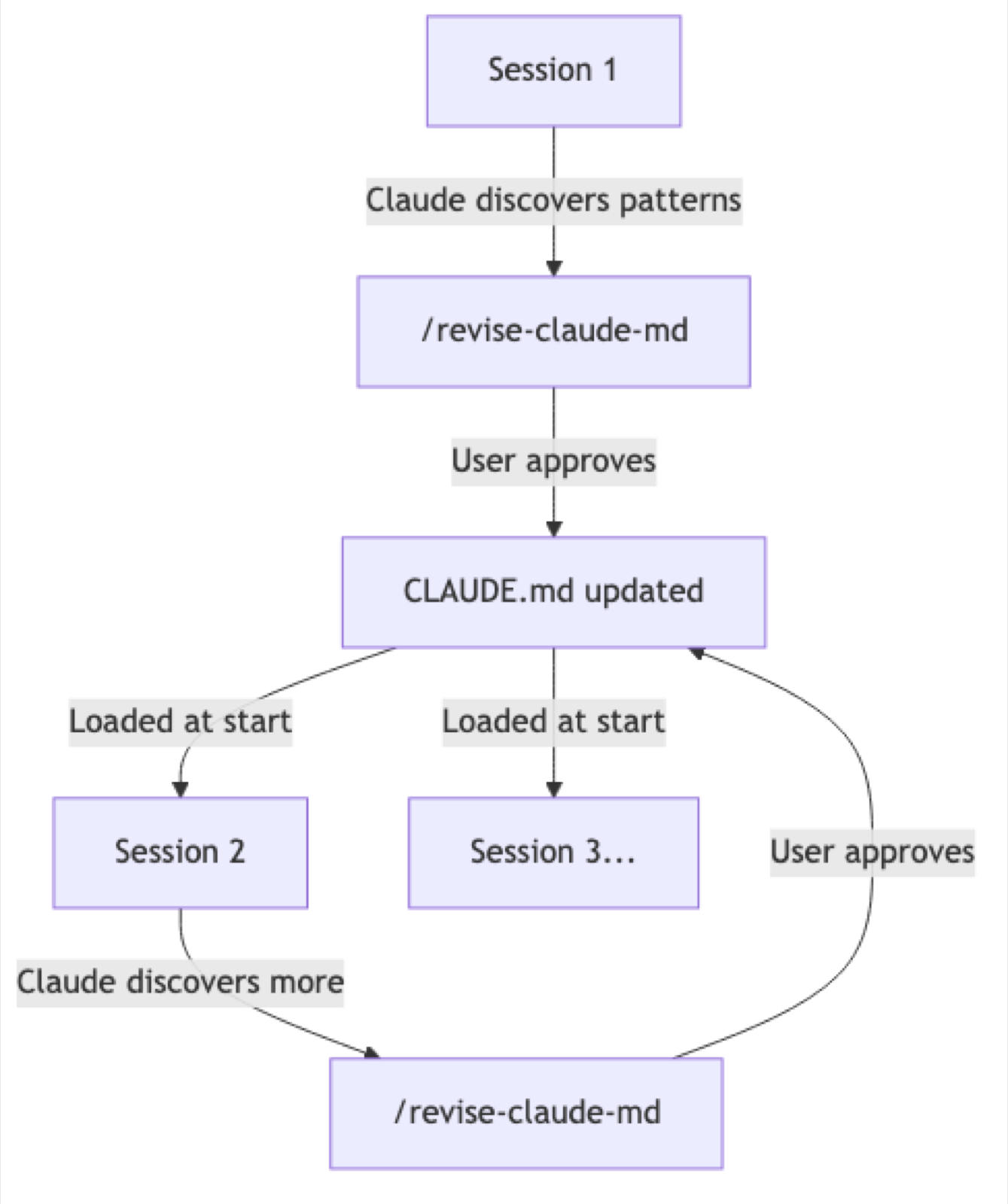
Without this loop, every session starts from zero. With maintained CLAUDE.md files, knowledge is immediately available, saving tokens and turns.
Key constraint: the loop requires explicit user action (/revise-claude-md) and approval. There is no automatic, silent learning.
8. Multi-Agent Architecture
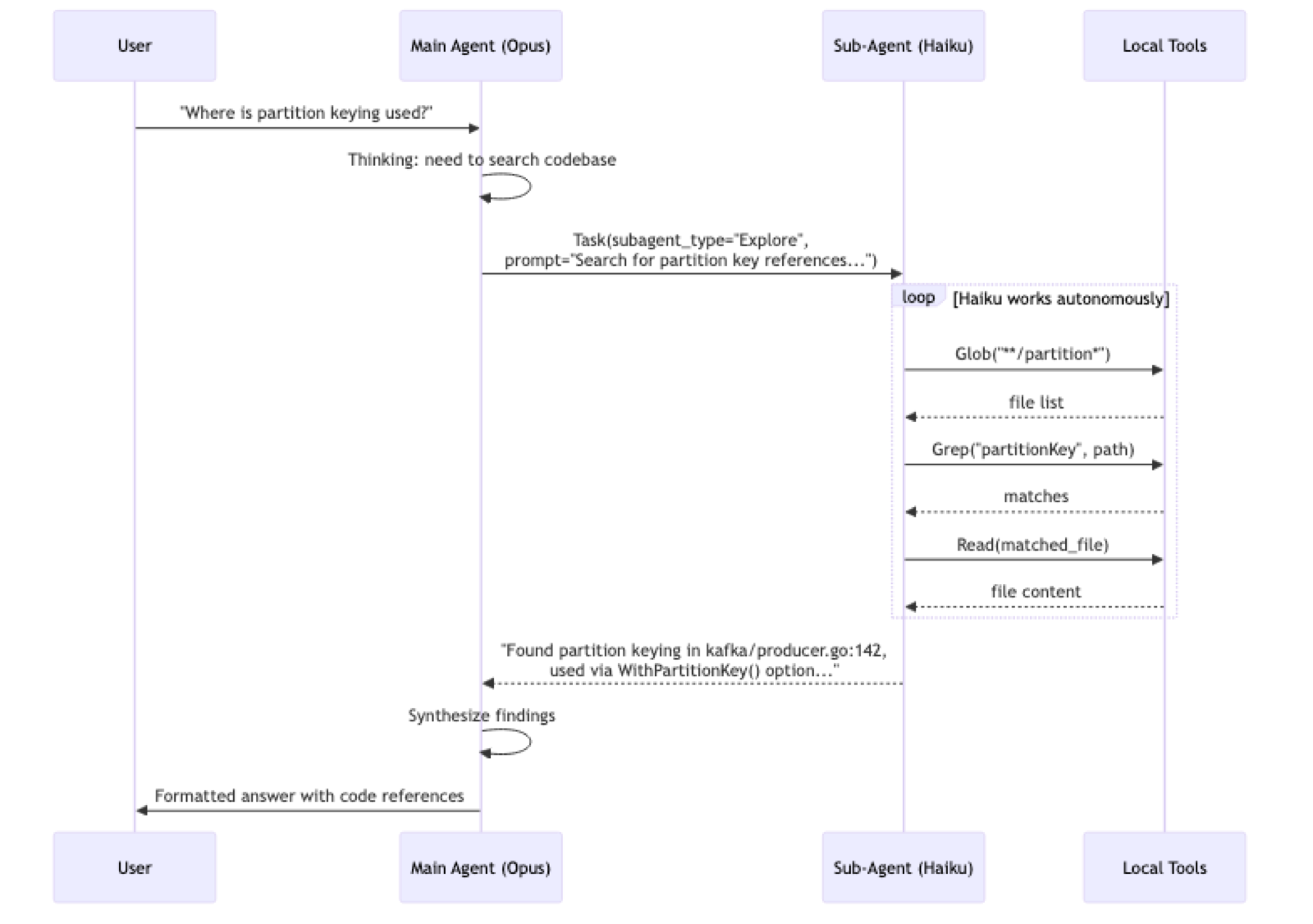
Claude Code uses a cost-tiered orchestrator/worker pattern, delegating focused tasks to cheaper, faster models while reserving the primary model for reasoning and synthesis.
Model Distribution
| Model | Share | Role |
|---|---|---|
| Opus 4.5 | 53.5% | Main session orchestrator |
| Haiku 4.5 | 45.9% | Sub-agent worker |
<synthetic> |
<1% | System-generated / test |
Nearly half of all model invocations are delegated to Haiku sub-agents.
Sub-Agent Types
| Type | Frequency | Purpose |
|---|---|---|
Explore |
91% | Code search, file discovery, codebase understanding |
Plan |
9% | Architecture planning, implementation strategy |
Bash |
rare | Command execution specialist |
general-purpose |
rare | Multi-step tasks, research |
Orchestration Flow
Sub-Agent Isolation
Each sub-agent gets its own isolated transcript:
projects/{project-path}/
├── {session-id}.jsonl              # Main session (Opus)
├── subagents/
│   ├── agent-a6569ce.jsonl         # Sub-agent 1 (Haiku)
│   ├── agent-a894fe6.jsonl         # Sub-agent 2 (Haiku)
│   └── agent-a33d37c.jsonl         # Sub-agent 3 (Haiku)
└── tool-results/
└── toolu_*.txt # Shared tool output storage- Main transcript contains only
isSidechain: falseentries - Sub-agent entries have their own
agentId - Results flow back as
tool_resultuser messages
Capability Differences
| Capability | Opus | Haiku |
|---|---|---|
| Tool use (Read, Grep, Glob, etc.) | Yes | Yes |
| Tool reference blocks | Yes | No |
| Extended thinking | Yes | Limited |
| Orchestrating sub-agents | Yes | No |
| Complex reasoning | Primary use | Not used |
Task Management
Tasks are tracked in todos/ as JSON files:
[
  {"content": "Analyze repository structure", "status": "completed", "activeForm": "Analyzed repository structure"},
  {"content": "Create CLAUDE.md file", "status": "in_progress", "activeForm": "Creating CLAUDE.md file"}
]
Task states: pending → in_progress → completed
Plans created during plan-mode are stored as markdown in plans/ with generated names (e.g., keen-juggling-map.md).
Cost Optimization
The massive cache read numbers (1.19B for Opus) show prompt caching is the primary cost-reduction mechanism, while Haiku delegation is secondary.
Delegating a 10K-token search task to Haiku instead of Opus saves ~95% on that call.
9. File History and Undo
Before any file edit, Claude Code creates a backup:
{
  "type": "file-history-snapshot",
  "snapshot": {
    "trackedFileBackups": {
      "path/to/file.go": {
        "backupFileName": "f7d9dacd95859bad@v1",
        "version": 1,
        "backupTime": "2026-01-23T20:49:38.389Z"
      }
    }
  }
}
Backups are stored in file-history/{session-id}/:
- Named as
{content-hash}@v{version} - Versions increment per edit (v1, v2, v3...)
- Up to 11+ versions observed for heavily-edited files
- Enables the
/undocommand to revert changes
Snapshot types:
isSnapshotUpdate: false— full snapshot (all tracked files)isSnapshotUpdate: true— incremental (only changed files)
10. Message Queue
The queue-operation entries handle asynchronous user input:
| Operation | Purpose |
|---|---|
enqueue |
User sends a message while Claude is processing |
dequeue |
Claude picks up the next queued message |
popAll |
Clears the queue (new directive supersedes) |
remove |
Removes a specific queued item |
This allows users to type follow-up messages or corrections without waiting for the current turn to complete.
11. Thinking Blocks and Signatures
{
  "type": "thinking",
  "thinking": "The user wants me to check a test file...",
  "signature": "EocDCkYICxgC..."
}- Thinking is streamed separately from text, enabling collapsible UI display
- Cryptographic signatures (~300+ bytes base64) verify the thinking block was genuinely produced by Claude (tamper detection)
- Thinking metadata at session level controls depth:
"level": "high","disabled": false - After compaction, thinking blocks are dropped (signatures are useless without exact original content)
12. Shell Environment Snapshots
Files in shell-snapshots/ capture the full zsh/bash state:
- Named:
snapshot-zsh-{timestamp}-{random}.sh - Content: unset aliases, shell function definitions, environment variables
- Purpose: ensure tool execution has a clean, reproducible shell environment
- ~109 snapshots observed, ~8-9KB each
13. Feature Flags (Statsig)
Claude Code uses Statsig for feature flag management:
statsig/
├── statsig.cached.evaluations.*   # Feature flag states
├── statsig.stable_id.*            # User identifier
├── statsig.session_id.*           # Session tracking
└── statsig.last_modified_time.*   # Cache freshness
This enables:
- A/B testing of new features
- Gradual rollouts
- Per-user feature targeting
- Model-specific feature gating (e.g., tool search only on Sonnet 4+/Opus 4+)
14. End-to-End Flow: What Happens in a Turn
15. Key Numbers
| Metric | Value |
|---|---|
| Context window | ~500K characters (~200K tokens) |
| Compaction threshold | ~150K tokens |
| Auto-search disable threshold | 50K chars remaining |
| Max file read | 25,000 tokens |
| Max LSP diagnostics | 10/file, 30 total |
| Cache hit ratio | ~94% |
| Typical context growth | ~1K-5K tokens/turn |
| Largest session observed | 47MB transcript, 10,675 entries |
| Longest session | 8,478 messages across 14+ days |