Extending Claude Code
This document describes how to extend and customize Claude Code through its plugin and hook architecture as I understand the matter. It covers all extensibility mechanisms with actionable instructions for implementation. As the corresponding document ('Understanding Claude Code') the information provide here was to some extend inferred from examining the ~/.claude/ directory structure, debug logs, session transcripts, and configuration files.
Note: Details such as hook events, plugin structure, MCP configuration, and available integrations may change over time.
Table of Contents
- Overview
- Hooks
- Plugins
- Skills
- Commands
- Agents
- MCP (Model Context Protocol)
- CLAUDE.md Management
- Extensibility Invocation Flow
- Configuration Reference
- Best Practices
1. Overview
Claude Code's extensibility system provides five mechanisms:
| Mechanism | Invoked By | Purpose |
|---|---|---|
| Hooks | System events | Automate actions (validation, formatting, testing) |
| Plugins | System | Bundle hooks, skills, commands, agents, MCP configs |
| Skills | Claude (auto) | Context-aware expertise Claude activates autonomously |
| Commands | User (/cmd) |
Slash commands users invoke directly |
| Agents | Claude | Specialized workers Claude spawns for complex tasks |
| MCP Servers | Tools | Connect external services (GitHub, Slack, etc.) |
2. Hooks
Hooks execute shell commands in response to Claude Code lifecycle events. Use them to enforce policies, automate formatting, run tests, or integrate with external tools.
Hook Events
| Event | When It Fires | Typical Use |
|---|---|---|
PreToolUse |
Before a tool executes | Validation, blocking dangerous operations |
PostToolUse |
After a tool executes | Auto-formatting, linting, running tests |
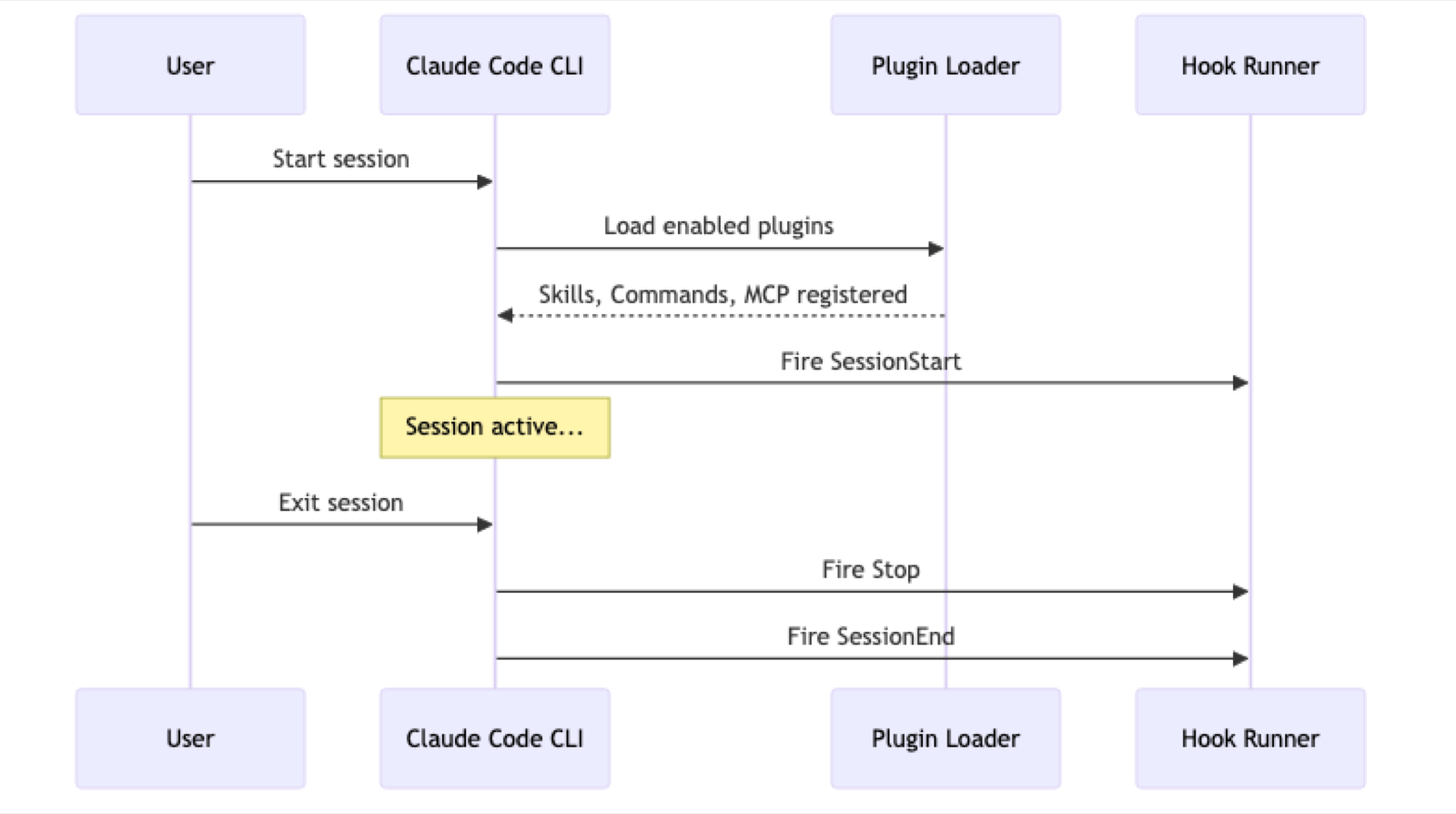
SessionStart |
When a session begins | Initialize resources, load configs |
SessionEnd |
When a session ends | Cleanup, save state |
Stop |
When Claude stops working | Final cleanup |
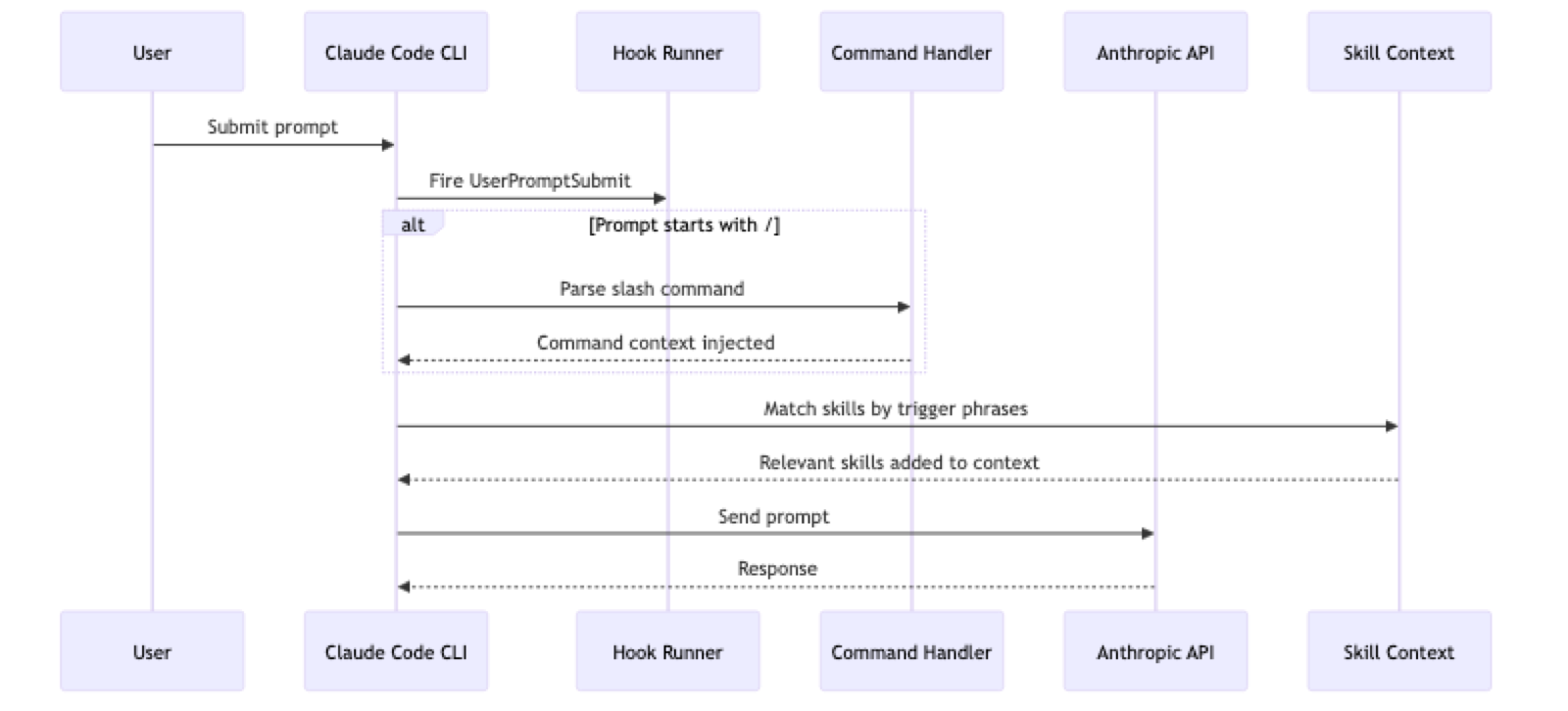
UserPromptSubmit |
Before processing user input | Validate or modify prompts |
PreCompact |
Before context compaction | Custom context management |
Notification |
On specific events | Handle permission_prompt, idle_prompt, auth_success |
Hook Configuration
Hooks are configured in JSON settings files:
| Location | Scope |
|---|---|
~/.claude/settings.json |
Global (all projects) |
.claude/settings.json |
Project-specific |
plugin/hooks/hooks.json |
Plugin-provided |
Basic Structure
{
  "hooks": {
    "EVENT_NAME": [
      {
        "matcher": "TOOL_PATTERN",
        "hooks": [
          {
            "type": "command",
            "command": "your-shell-command"
          }
        ]
      }
    ]
  }
}
Fields
| Field | Required | Description |
|---|---|---|
matcher |
No | Regex pattern to match tool names (e.g., Edit|Write) |
type |
Yes | Hook type — use "command" |
command |
Yes | Shell command to execute |
Environment Variables
Hooks have access to these variables:
| Variable | Description |
|---|---|
$CLAUDE_FILE_PATH |
Path to the file being operated on |
$CLAUDE_TOOL_NAME |
Name of the tool being used |
${CLAUDE_PLUGIN_ROOT} |
Root directory of the plugin (plugin hooks only) |
Common Hook Patterns
Auto-Format on File Changes
Add to ~/.claude/settings.json:
{
  "hooks": {
    "PostToolUse": [
      {
        "matcher": "Edit|Write|MultiEdit",
        "hooks": [
          {
            "type": "command",
            "command": "prettier --write \"$CLAUDE_FILE_PATH\" 2>/dev/null || true"
          }
        ]
      }
    ]
  }
}
Language-specific formatters:
| Language | Command |
|---|---|
| JavaScript/TypeScript | prettier --write "$CLAUDE_FILE_PATH" |
| Python | black "$CLAUDE_FILE_PATH" or ruff format "$CLAUDE_FILE_PATH" |
| Go | gofmt -w "$CLAUDE_FILE_PATH" |
| Rust | rustfmt "$CLAUDE_FILE_PATH" |
Block Sensitive File Modifications
{
  "hooks": {
    "PreToolUse": [
      {
        "matcher": "Edit|Write",
        "hooks": [
          {
            "type": "command",
            "command": "if echo \"$CLAUDE_FILE_PATH\" | grep -qE '\\.env|\\.env\\.|credentials|secrets'; then echo 'BLOCKED: Cannot modify sensitive files' >&2; exit 1; fi"
          }
        ]
      }
    ]
  }
}
When a PreToolUse hook exits with non-zero status, the operation is blocked.
Auto-Run Related Tests
{
  "hooks": {
    "PostToolUse": [
      {
        "matcher": "Edit|Write",
        "hooks": [
          {
            "type": "command",
            "command": "if echo \"$CLAUDE_FILE_PATH\" | grep -qE '\\.(ts|tsx|js|jsx)$'; then npm test -- --findRelatedTests \"$CLAUDE_FILE_PATH\" --passWithNoTests 2>/dev/null || true; fi"
          }
        ]
      }
    ]
  }
}
Type Checking After Edits
{
  "hooks": {
    "PostToolUse": [
      {
        "matcher": "Edit|Write",
        "hooks": [
          {
            "type": "command",
            "command": "if echo \"$CLAUDE_FILE_PATH\" | grep -qE '\\.(ts|tsx)$'; then npx tsc --noEmit 2>&1 | head -20; fi"
          }
        ]
      }
    ]
  }
}
Notification Sound on Permission Prompt
{
  "hooks": {
    "Notification": [
      {
        "matcher": "permission_prompt",
        "hooks": [
          {
            "type": "command",
            "command": "afplay /System/Library/Sounds/Ping.aiff"
          }
        ]
      }
    ]
  }
}
3. Plugins
Plugins bundle multiple extensibility features into distributable packages.
Plugin Structure
my-plugin/
├── .claude-plugin/
│   └── plugin.json          # Manifest (required)
├── hooks/
│   └── hooks.json           # Hook configuration
├── .mcp.json                # MCP server configuration
├── commands/
│   └── my-command.md        # Slash commands
├── skills/
│   └── my-skill/
│       ├── SKILL.md         # Skill definition
│       ├── references/      # Supporting docs
│       ├── examples/        # Example files
│       └── scripts/         # Utility scripts
├── agents/
│   └── my-agent.md          # Agent definitions
└── README.md
Creating a Plugin
Step 1: Create the Manifest
Create .claude-plugin/plugin.json:
{
  "name": "my-plugin",
  "description": "What this plugin does",
  "version": "1.0.0",
  "author": {
    "name": "Your Name",
    "email": "you@example.com"
  }
}
Step 2: Add Components
Add any combination of:
hooks/hooks.json— event-driven automationcommands/*.md— user-invoked slash commandsskills/*/SKILL.md— model-invoked capabilitiesagents/*.md— specialized workers.mcp.json— external service connections
Step 3: Test Locally
Place the plugin in ~/.claude/plugins/cache/ or reference it in your plugin settings.
Installing and Managing Plugins
Plugins are stored in ~/.claude/plugins/:
plugins/
├── settings.json              # Enabled plugins
├── installed_plugins.json     # Installation metadata
├── known_marketplaces.json    # Marketplace registry
├── cache/                     # Installed plugins
└── marketplaces/              # Available plugins
Enable a Plugin
Edit ~/.claude/plugins/settings.json:
{
  "enabledPlugins": {
    "my-plugin@marketplace-name": true,
    "gopls-lsp@claude-plugins-official": true
  }
}
Official Plugins
The official marketplace (anthropics/claude-plugins-official) includes:
Language Servers (LSP):
- TypeScript, Python, Go, Rust, C/C++, Java, Kotlin, Swift, C#, PHP, Lua
Development:
feature-dev— structured feature development workflowpr-review-toolkit— pull request review toolscode-review— code review assistanceplugin-dev— plugin development toolkit
Git/Workflow:
commit-commands— git commit helpershookify— hook management
Documentation:
claude-md-management— CLAUDE.md file maintenance
4. Skills
Skills are context-aware capabilities that Claude activates autonomously based on trigger conditions. Unlike commands, users don't invoke skills directly — Claude decides when to use them.
Creating a Skill
Create skills/my-skill/SKILL.md:
---
name: my-skill
description: "This skill should be used when the user asks about database migrations or mentions schema changes"
version: 1.0.0
license: MIT
---

# Database Migration Expert

This skill provides expertise in database migrations.

## When to Use

- When the user asks about schema changes
- When working with migration files
- When discussing database versioning

## Guidelines

1. Always check existing migrations before creating new ones
2. Use reversible migrations when possible
3. Test migrations on a copy of production data

## Common Commands

- `npm run migrate` — run pending migrations
- `npm run migrate:rollback` — rollback last migration
Skill Fields
| Field | Required | Description |
|---|---|---|
name |
Yes | Unique identifier |
description |
Yes | Trigger conditions (include specific phrases) |
version |
No | Semantic version |
license |
No | License type |
Skill Best Practices
- Include trigger phrases: Write descriptions like "This skill should be used when the user mentions X or asks about Y"
- Use third person: "This skill provides..." not "I provide..."
- Progressive disclosure: Keep SKILL.md concise; put details in
references/ - Single focus: One skill per domain area
Skill Directory Structure
skills/my-skill/
├── SKILL.md              # Core skill definition
├── references/           # Detailed documentation
│   ├── patterns.md
│   └── examples.md
├── examples/             # Code examples
│   └── sample.sql
└── scripts/              # Utility scripts
    └── validate.sh
5. Commands
Commands are user-invoked slash commands (e.g., /review-pr, /commit).
Creating a Command
Create commands/my-command.md:
---
description: Run database migrations with safety checks
argument-hint: [--dry-run] [--target VERSION]
allowed-tools: [Bash, Read, Glob]
model: haiku
---

# Database Migration Command

When invoked, perform these steps:

1. Check for pending migrations using `npm run migrate:status`
2. If `--dry-run` is specified, show what would be executed without running
3. If `--target` is specified, migrate to that specific version
4. Run the migration: `npm run migrate`
5. Verify the migration succeeded by checking the schema

## Safety Checks

- Never run migrations if uncommitted changes exist in migration files
- Always create a backup reminder before destructive migrations
Command Fields
| Field | Required | Description |
|---|---|---|
description |
Yes | Short description for /help |
argument-hint |
No | Usage pattern shown to users |
allowed-tools |
No | Restrict available tools |
model |
No | Override model (e.g., haiku for simple tasks) |
Invoking Commands
Users invoke commands with:
/my-command --dry-runClaude receives the command markdown as context and follows its instructions.
6. Agents
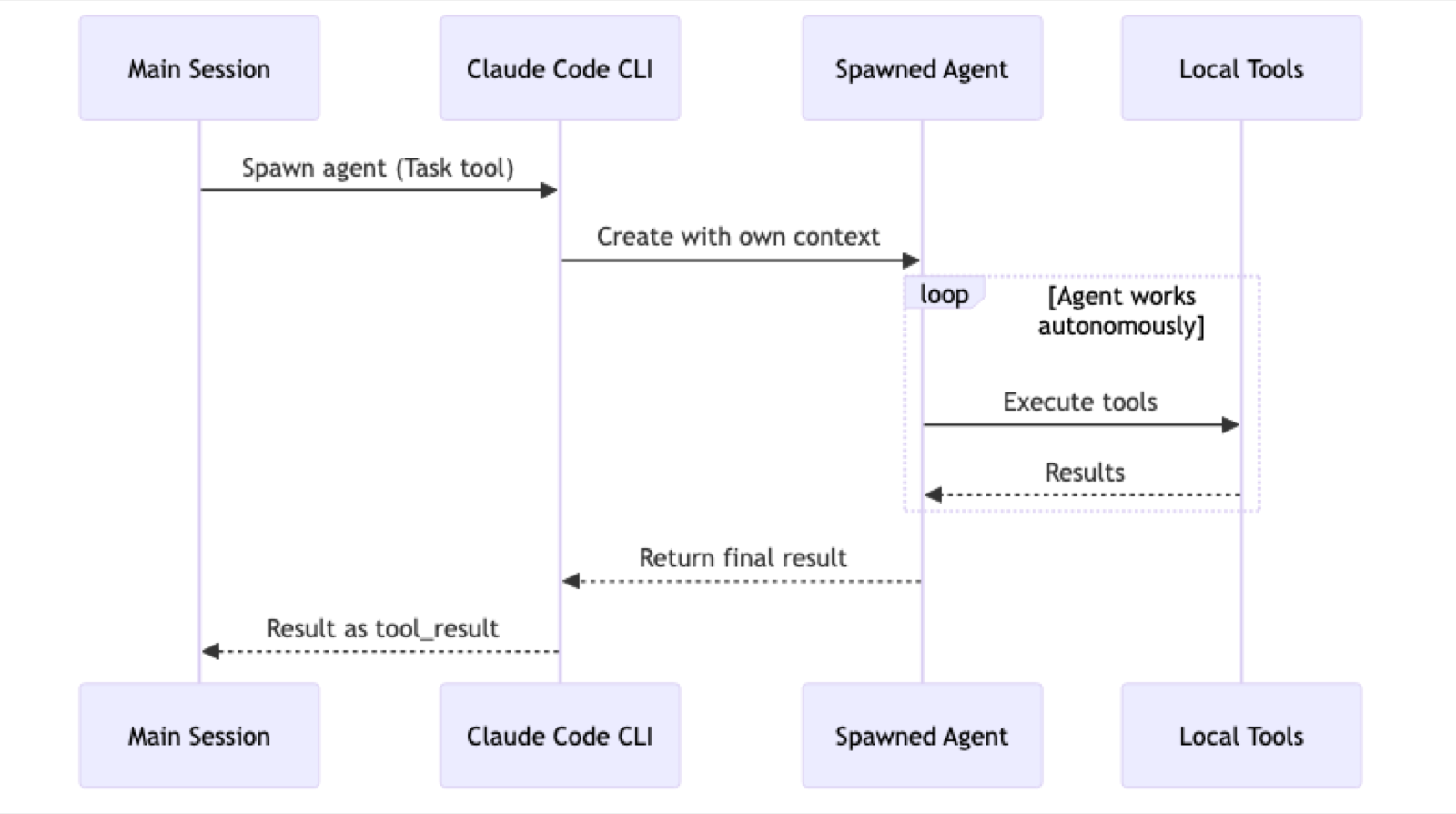
Agents are specialized workers Claude spawns for complex tasks. They operate autonomously with their own conversation context.
Creating an Agent
Create agents/my-agent.md:
---
name: security-reviewer
description: Reviews code for security vulnerabilities
---

# Security Reviewer Agent

You are a specialized security reviewer. Your task is to analyze code for vulnerabilities.

## Review Checklist

- [ ] SQL injection vulnerabilities
- [ ] XSS attack vectors
- [ ] Authentication bypasses
- [ ] Sensitive data exposure
- [ ] Insecure dependencies

## Process

1. Read all files in the specified directory
2. Identify potential vulnerabilities
3. Categorize by severity (Critical, High, Medium, Low)
4. Provide remediation recommendations

## Output Format

Return findings as:
[SEVERITY] Vulnerability Name
File: path/to/file.js:123 Issue: Description of the vulnerability Fix: Recommended remediation
Built-in Agent Types
Claude Code includes these built-in agents:
| Type | Purpose | Tools |
|---|---|---|
Explore |
Codebase exploration | Read, Glob, Grep, WebFetch, WebSearch |
Plan |
Implementation planning | All read-only tools |
Bash |
Command execution | Bash only |
general-purpose |
Multi-step complex tasks | All tools |
How Agents Work
7. MCP (Model Context Protocol)
MCP connects Claude Code to external services and tools.
Configuration
Create .mcp.json in your plugin or project:
{
  "mcpServers": {
    "github": {
      "type": "http",
      "url": "https://api.githubcopilot.com/mcp/",
      "headers": {
        "Authorization": "Bearer ${GITHUB_PERSONAL_ACCESS_TOKEN}"
      }
    },
    "local-database": {
      "type": "stdio",
      "command": "node",
      "args": ["./mcp-server.js"]
    }
  }
}
Server Types
| Type | Description | Use Case |
|---|---|---|
http |
REST API | Cloud services (GitHub, Slack) |
stdio |
Local process | Local tools and scripts |
sse |
Server-Sent Events | Real-time hosted services |
websocket |
WebSocket | Bidirectional real-time |
HTTP Server Configuration
{
  "service-name": {
    "type": "http",
    "url": "https://api.example.com/mcp/",
    "headers": {
      "Authorization": "Bearer ${API_TOKEN}",
      "X-Custom-Header": "value"
    }
  }
}
stdio Server Configuration
{
  "local-tool": {
    "type": "stdio",
    "command": "python",
    "args": ["./my_mcp_server.py", "--config", "prod"],
    "env": {
      "DATABASE_URL": "${DATABASE_URL}"
    }
  }
}
Available Integrations
Productivity: GitHub, GitLab, Slack, Asana, Linear, Jira, Confluence, Notion
Development: Greptile, Playwright, Context7
Database: Supabase, Firebase, Pinecone
Deployment: Vercel, Sentry
Other: Figma, Stripe, Hugging Face
8. CLAUDE.md Management
The claude-md-management plugin provides tools to maintain project memory.
/revise-claude-md Command
Run at session end to capture learnings:

What it captures:
- Build commands and workflows discovered
- Code style patterns observed
- Testing approaches that worked
- Environment quirks and gotchas
claude-md-improver Skill
Audits CLAUDE.md quality against a 100-point rubric:
| Criterion | Weight | What it checks |
|---|---|---|
| Commands/workflows | 20pts | Are build/test/lint commands documented? |
| Architecture clarity | 20pts | Is directory structure clear? |
| Non-obvious patterns | 15pts | Are gotchas captured? |
| Conciseness | 15pts | Is every line useful? |
| Currency | 15pts | Do commands actually work? |
| Actionability | 15pts | Can you copy-paste instructions? |
Red flags it detects:
- Commands that would fail
- References to deleted files
- Generic advice not specific to project
- Stale TODO items
9. Extensibility Invocation Flow
Session Lifecycle
Turn Execution
Tool Execution Loop
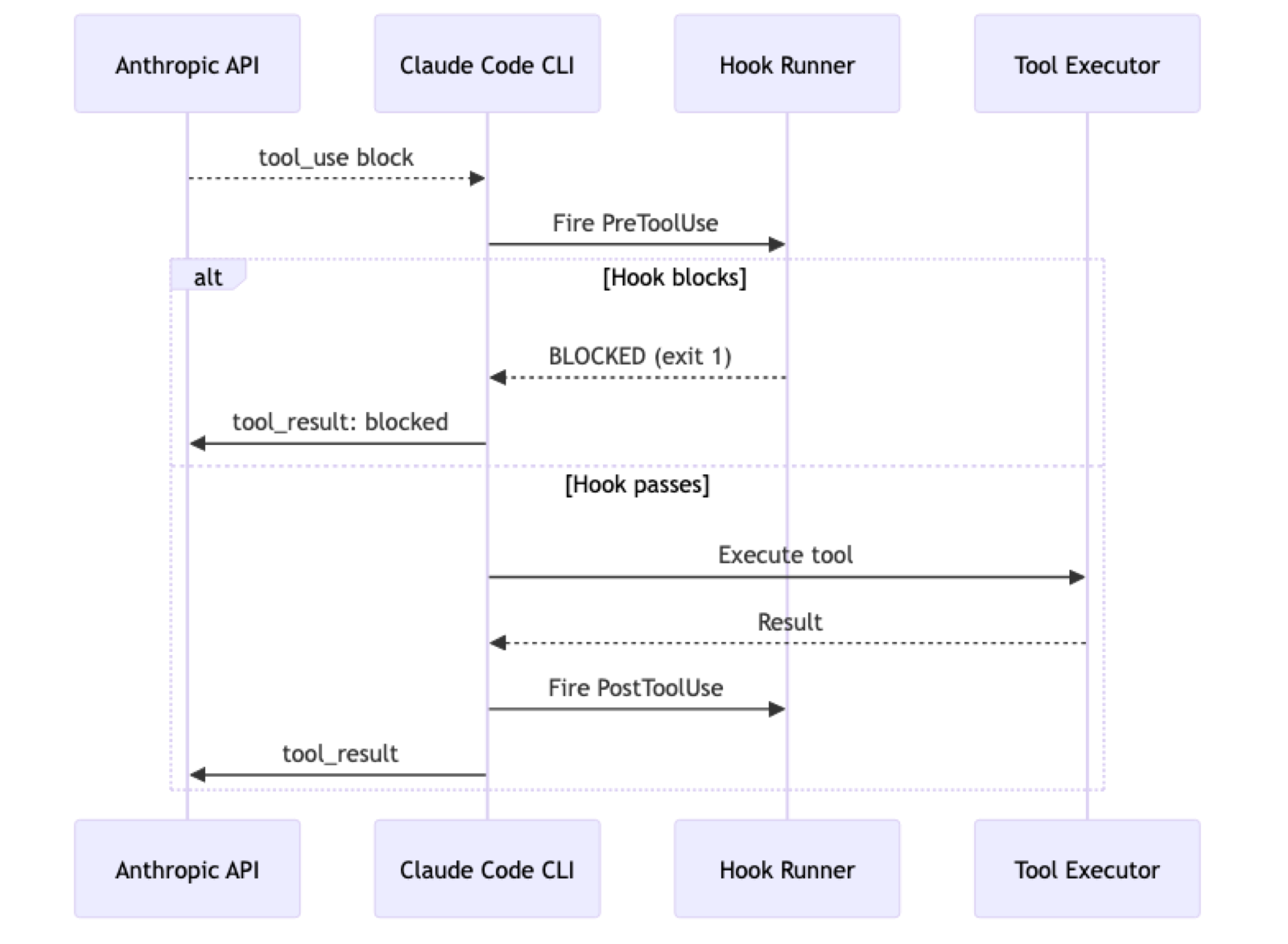
10. Configuration Reference
Global Settings
~/.claude/settings.json:
{
  "hooks": {
    "PostToolUse": [...],
    "PreToolUse": [...]
  }
}
Plugin Settings
~/.claude/plugins/settings.json:
{
  "enabledPlugins": {
    "plugin-name@marketplace": true
  },
  "alwaysThinkingEnabled": true
}
Project Settings
.claude/settings.json:
{
  "hooks": {
    "PostToolUse": [...]
  }
}
Local Overrides (gitignored)
.claude/settings.local.json:
{
  "hooks": {
    "PostToolUse": [...]
  }
}
11. Best Practices
Hook Development
- Use PreToolUse for validation — block before damage occurs
- Use PostToolUse for side effects — formatting, linting, testing
- Handle errors gracefully — append
|| trueto prevent hook failures from blocking work - Use portable paths — leverage
${CLAUDE_PLUGIN_ROOT}for plugin scripts - Keep hooks fast — slow hooks degrade the user experience
Plugin Development
- Follow standard structure — use conventional directories for auto-discovery
- Include working examples — demonstrate all features
- Progressive disclosure — keep core docs concise, details in
references/ - Version your plugins — use semantic versioning
- Document trigger conditions — for skills, be explicit about when they activate
Security Considerations
- Never store secrets in hooks — use environment variables with
${VAR}syntax - Validate file paths — prevent path traversal attacks in custom hooks
- Limit hook scope — use specific matchers rather than catching all operations
- Review plugin sources — only install plugins from trusted sources
- Use
.localfiles — keep sensitive project-specific hooks out of git
Skill Design
- Include specific trigger phrases — "when the user asks about X"
- Write in third person — "This skill provides..." not "I provide..."
- One skill per domain — don't overload a single skill
- Keep SKILL.md focused — put reference material in subdirectories
Command Design
- Clear argument hints — show users the expected format
- Restrict tools when appropriate — use
allowed-toolsfor safety - Use lighter models for simple tasks — specify
model: haikuwhen possible - Provide step-by-step instructions — Claude follows the markdown literally