Apply Claude
About This Guide
This guide provides a comprehensive explanation of how to use Claude: the basics, areas of application, and ways of working—from the chat interface to Cowork and Claude Code. It is intended for both readers with prior knowledge and beginners, and organizes the features based on their uses and costs. If you haven’t set up Claude yet, you’ll find the initial setup instructions in Chapter 0 at the very end of this document.
Last updated: written in November 2026. The Claude Code version described here is 2.1.319. Prices, limits, and feature sets change frequently; be sure to check them on the linked Anthropic pages before making a decision.
Legal Notice
© 2026 Kai Stalmann. All rights reserved.
Publisher: qantr GmbH, Berlin
Author: Dr. Kai Stalmann
Contact: kai@qantr.com
As of November 2026. The products, prices, and features described are current as of the time of publication and are subject to change. Claude and Anthropic are trademarks of Anthropic PBC. All other product names mentioned are trademarks of their respective owners.
Written with the support of Claude Code and DeepL.
Part I: Fundamentals and Operational Decisions
Chapter 1: Fundamentals and Core Components
1.1 Operating Principle and Performance Profile
Explains how the language model works and its context window (the amount of text it takes into account at any one time), and uses this to determine the types of tasks for which Claude is suitable.
Operating Principle
The name Claude refers to two things: a family of language models (currently the Haiku, Sonnet, Opus and Fable series) and the assistant as which these models operate within Anthropic’s applications. You can choose which model responds (2.2). The model generates each response token by token (a token is a word or part of a word) as a probable continuation of the text so far. In doing so, it draws on two sources: the fixed training knowledge and the content of the context window.
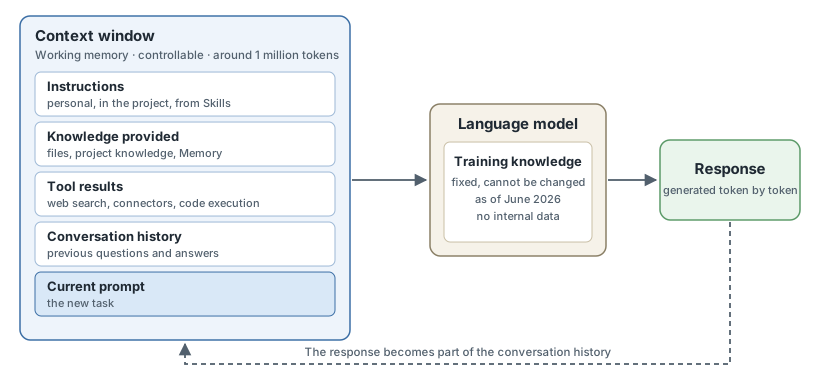
Figure 1: The two sources of knowledge for a response. Claude cannot know anything that is not contained in either the training knowledge or the context window.
| Feature | Implications for use |
|---|---|
| The generated text is probable, but has not been verified. | Incorrect information sounds just as certain as correct information. Facts, figures and quotations require a source or cross-checking (2.1). |
| Training knowledge ends in June 2026 and does not contain any internal data. | Current and personal information must be added to the context window: as a file, via a web search or via a connector. |
| Claude can only see what is in the context window. | Every conversation starts empty, unless projects, Memory or personal instructions insert content (8.3). |
| The continuation is selected, not calculated deterministically. | The same question yields answers phrased differently. Consistent results require specifications to be defined in templates or skills (9.1). |
| Before responding, the model reflects in intermediate steps (Thinking); the level of effort is adjustable. | Challenging tasks benefit from a higher level of effort, though this consumes time and usage quotas (2.2). |
Context window
- Size: Current models can handle up to 1 million tokens, roughly 2,000 pages of text.
- Content: Everything is included: instructions, files, images, tool outputs, the entire history and the resulting response, including the thought process. Tools and connectors take up a particularly large amount of space.
- Filling: As the amount of content grows, accuracy and recall decrease. When approaching the limit, Claude automatically summarises previous messages (in paid plans with code execution enabled), though details may be lost.
Hence the working rule: only include relevant material and start a new conversation for a new topic.
Performance profile
A task is suitable if it can be defined as work on text, code or data; if the necessary material is contained in the training knowledge or fits within the context window; and if the result can be verified.
| Strength | Typical tasks | Explored in depth in |
|---|---|---|
| Understanding and summarising | summarising, explaining, answering questions about documents, extracting information | 3.1, 3.2 |
| Weighing up | comparing, evaluating, formulating counter-arguments | 3.3 |
| Drafting and reworking | drafting texts and outlines, translating, adapting tone and format | Chapter 4 |
| Programming | reading, writing and checking code | Chapter 5 |
| Working with tools | researching, creating files, executing processes | Chapter 9 |
Where reliability ends is covered in 2.1.
1.2 List of core modules
Defines each core module and lists the sub-sections that provide further detail (as at 04/11/2026). The ‘Status’ column indicates pre-release versions and unconfirmed items; an empty field means that no restriction is documented. Section 2.2 covers which tariff includes which module.
| Module | Function | Status | In-depth |
|---|---|---|---|
| A. Model | |||
| Model series | Haiku, Sonnet, Opus and Fable differ in performance, speed and cost. Fable is the generally available version of Mythos, which is reserved for verified organisations. | 1.1, 2.2 | |
| Cognitive effort and thinking | Two separate settings determine how thoroughly the model thinks before responding; greater effort consumes time and usage quotas. | 1.1, 2.2 | |
| Context window | This limits the amount of text the model considers at any one time. | 1.1, 8.3 | |
| Input and output formats | The model accepts text and images and outputs text; other formats are generated via tools such as code execution. | 2.1, 8.1 | |
| B. Commands and Control | |||
| Prompt | A prompt is a single command issued to the model. | 8.1 | |
| Personal Instructions | These apply permanently to all conversations within an account. | 8.3 | |
| Memory | Claude remembers topics from previous conversations; the entries can be edited individually. | 8.3 | |
| Styles | They define tone and format as selectable presets. | No longer documented in the help pages | 4.2 |
| Learning mode | Claude guides you like a tutor by asking follow-up questions. | Documented only for Claude for Education | 3.4 |
| Incognito chats | These conversations are not saved in the history or in Memory. | 11.1 | |
| C. Knowledge and Information | |||
| Projects | They bring together knowledge, instructions and files for a specific task. | 8.3 | |
| File and image analysis | Claude reads uploaded documents, spreadsheets and images. | 3.2 | |
| Web search | Claude bases its answers on current web sources. | 3.1 | |
| Research | Claude conducts research across multiple sources in several steps. | 3.1 | |
| Searching in previous chats | Claude retrieves content from previous conversations. | 8.3 | |
| D. Integration | |||
| Connectors | They connect Claude to external services and their data. | 8.4 | |
| MCP (Model Context Protocol) | This open standard governs how models integrate with tools and data; connectors are based on it. | Integration via the API (MCP connector): Beta | 8.4, 10.3 |
| Directory | Anthropic’s catalogue lists connectors and plugins for adding. | 8.4, 11.2 | |
| Interactive apps (MCP apps) | Third-party applications can be used directly within the chat. | 8.4 | |
| Desktop extensions | These provide local MCP packages for the desktop app. | Deprecated directory entries | 8.4 |
| E. Results | |||
| Code execution and file creation | Claude executes code in a sandboxed environment to create or edit files. | 4.3 | |
| Artifacts | Results appear as standalone objects in a panel next to the chat. | 4.3 | |
| Claude Docs, Slides and Design | These artefact templates are used for documents, presentations and visual designs. | 4.3 | |
| Charts and diagrams | Visualisations appear interactively in the chat and in Cowork. | Beta | 3.2 |
| Dashboards | They display live data from sources such as BigQuery or Salesforce. | Beta | 3.2 |
| Claude Motion | It generates animations from code and is not a video model. | Beta | 4.3 |
| F. Reuse and extension | |||
| Skills | They store instructions for recurring tasks. | 9.1 | |
| Plugins | They bundle skills, connectors, commands, agents (systems that carry out sub-steps autonomously) and hooks (automatically triggered processes). Agents and hooks from a plugin remain inactive in chat. | 9.1, 11.2 | |
| G. Action and Delegation | |||
| Cowork | Claude carries out multi-step tasks autonomously using files and applications. | Web and mobile: in Team Beta, in Enterprise upon approval | 9.4 |
| Scheduled tasks | Tasks run on a timed and recurring basis. | 9.3 | |
| Computer Use | Claude operates the screen and programs. | Desktop app: Beta; Claude Code: Research Preview | 9.4 |
| Claude in Chrome | Claude acts as an agent within the Chrome browser. | 9.4 | |
| Claude Duet | This agent takes action on its own initiative, for example with a morning briefing and regular checks. | Research Preview, USA only | 9.4 |
| Claude Code | Claude works directly on the source code: in the terminal, in the IDE (integrated development environment), in the desktop app or in the cloud. | 5.1 | |
| CLAUDE.md and Hooks | The CLAUDE.md file defines project rules; hooks are custom actions that Claude Code automatically executes when certain events occur. | 5.3 | |
| Code Review | Multiple agents review code changes before they are committed. | 5.2 | |
| Subagents, Agent Teams, Dynamic Workflows | They distribute work across multiple agents running in parallel. | Agent Teams: experimental | 9.2 |
| H. Access and integration methods | |||
| Web, desktop and mobile | The Claude app is used directly via these interfaces. | Linux: Beta | 2.2 |
| Voice mode | The conversation is conducted verbally; Claude responds with pre-recorded voices. | Beta | 8.1 |
| Office add-ins | Claude works in Excel, PowerPoint, Word and Outlook. | Outlook: Beta | 10.1 |
| Claude for Google Workspace | Claude works in Docs, Sheets and Slides. | Beta | 10.1 |
| Claude Tag | Teams can address Claude via @mentions, initially in Slack; the organisation manages access. | Public Beta | 10.1 |
| Claude in Microsoft Copilot | Microsoft uses Claude models in Copilot and operates this integration itself. | Disabled by default in the EU, EFTA and the UK; enabled in Word, Excel and PowerPoint depending on the tenant | 10.1 |
| Messages API and Tool Use | Your own software uses Claude via the programming interface; Claude calls functions of this software via Tool Use. | 10.2 | |
| Platform Services | Additional API functions reduce costs and control output, including batch processing, caching of recurring prompt sections (Prompt Caching) and structured outputs. | Stable; availability varies by platform | 10.2 |
| Agent SDK | Claude Code’s agent technology is available as a program library. | 10.2 | |
| Managed Agents | Agents run on an infrastructure managed by Anthropic. | Beta | 10.2 |
| Cloud deployment | Claude is also available via Amazon Bedrock, Claude Platform on AWS, Google Cloud and Microsoft Foundry. | 10.3 | |
| I. Organisation and product offerings | |||
| Pricing plans | Free, Pro, Max, Ultra, Team, Enterprise, Education and Government define the scope of features and usage limits. | 2.2 | |
| Administration | Roles and permissions, single sign-on (SSO), audit logs and retention policies govern operations within organisations. | 11.1 | |
| Claude Science | This working environment is intended for research, including clinical and medical research, but not for clinical or diagnostic use. | Beta | 3.5 |
| Claude Security | It continuously scans code for security vulnerabilities. | Public Beta | 5.2 |
| Industry-specific packages | There are dedicated packages for finance, legal, healthcare, life sciences, public sector and charitable organisations. | varies by package | 6.4 |
1.3 Interplay of the building blocks
Shows how task, knowledge, integration, result, reuse and delegation interlock, and which building block suits which task.
The building blocks fulfil six functions within a workflow: three determine what the model encounters, one determines the form of the result, and two make the process repeatable and autonomous.
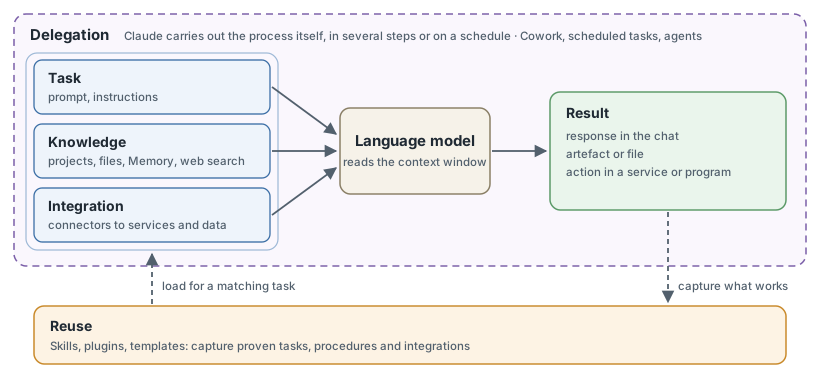
Figure 2: Interaction of the six building block groups. The groups correspond to sections B to G of the list in 1.2.
Selection of the building block
| Requirement | Building block | Note |
|---|---|---|
| Include material once | File in chat | This applies only to this conversation. |
| Provide knowledge and rules for a project | Project | Applies to all conversations within the project. |
| Set preferences for all conversations | Personal instructions, Memory | You write the instructions yourself; Memory is created by Claude. |
| Retrieve up-to-date information | Web search; for in-depth questions, use Research | Training knowledge ends in June 2026 (1.1). |
| Use data from a service or interact with it | Connector | This saves you from having to upload data repeatedly. |
| Perform a task in the same way every time | Skill | A skill describes a procedure; a project describes the background to an undertaking. Claude only loads it when the task is suitable. |
| Share skills and connectors as a bundle | Plugin | It contains skills, but does not replace them. |
| Edit or share a result | Artifact | For Word, Excel or PowerPoint, Claude generates a file. |
| Assign a multi-step task | Cowork | Claude takes action itself, rather than just replying. |
| Have a task carried out regularly | Scheduled task | It runs hourly, daily, weekly or on weekdays. |
| Work on source code | Claude Code | It reads and modifies the files of a software project directly. |
Typical expansion
The building blocks build on one another. A prompt that is repeated becomes a skill. Anything that applies to a project on a permanent basis is incorporated into the project. A skill that runs reliably can be delegated (Chapters 8 and 9).
Chapter 2: Decision on deployment
2.1 Suitability for tasks and limits of reliability
Identifies where results become unreliable and what Claude does not generate (such as photos, illustrations and realistic videos), and demonstrates how to work within these limits.
Limits of Reliability
Anthropic advises never to use Claude as the sole source and to verify information with significant implications. Five types of error are documented:
| Error type | How it manifests itself | Countermeasure |
|---|---|---|
| Fabricated information (hallucination) | Facts, figures and quotations sound convincing but are unsubstantiated. | Provide sources, require verbatim citations and explicitly allow the answer ‘I don’t know’. |
| Outdated information | Events after June 2026 are missing or incorrectly categorised. | Enable web search or provide up-to-date documents. |
| Abridged web sources | The summary omits contextual information from the original page, and its quality depends on the sources found. | Open the cited sources before reusing any information. |
| Alleged actions | Claude provides links that do not work, or reports an email as having been sent when it was never sent. | Check the result at its intended destination: in the inbox, in the document, in the service. |
| Inaccurate image interpretation | Counts and location details in images are approximations. Small, rotated and blurred images lead to errors. | Cross-check image analyses. Claude does not name individuals, does not recognise AI-generated images and does not replace the interpretation of CT or MRI scans. |
Added to this are the effects of lengthy conversations and varying phrasing (1.1). If the answer to the same question differs in content on the second attempt, this is a warning sign.
Level of scrutiny depending on the task
Two questions determine how thoroughly a result should be checked: Is an error apparent, and what is the cost of that error?
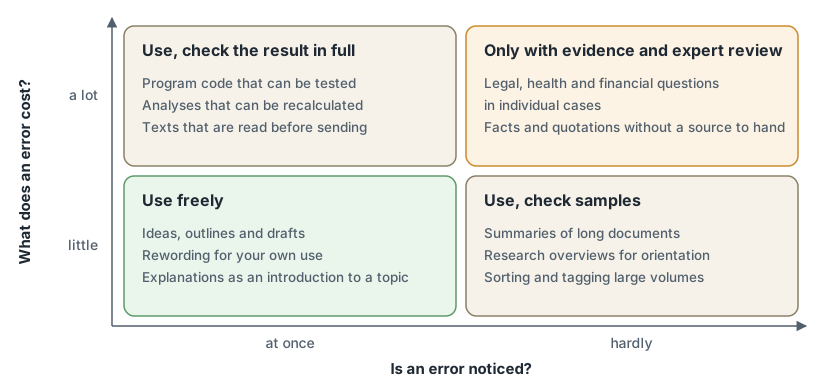
Figure 3: Level of scrutiny based on the detectability and consequences of an error, with typical tasks for each field.
If the subject-specific check is missing in the top-right box, the task is not suitable for Claude.
Media
| Medium | Possible | Not possible |
|---|---|---|
| Image | Diagrams, vector graphics (SVG), layouts and graphics calculated via code | Photos and illustrations. For image processing, there are connectors to design tools such as Adobe. |
| Video | Animations generated from code using Claude Motion (Beta) | Realistic footage and people |
| Audio | Spoken responses in voice mode using pre-defined voices | Voice clones. There is no documented service for generating audio freely. |
| Input | Text, images and documents | Video and audio files are not documented as input. |
2.2 Access requirements
Compares tariffs, user interfaces, models, default settings and regional availability as a basis for choosing the right package.
Pricing plans
Prices are quoted in US dollars per month, excluding tax (as at 5 November 2026). The plans up to Ultra each specify what is included in addition to the previous plan. The Team plan builds on the Pro plan, not the Ultra plan.
| Plan | Price | Usage volume | Intended for | Includes |
|---|---|---|---|---|
| Free | 0 | limited | Trying it out | Chat with Sonnet and Haiku, web search, file creation, Memory, connectors, skills, artefacts, up to 5 projects |
| Pro | 20 (17 with annual payment) | Reference | daily work | Opus, Research, Claude Code, Cowork and scheduled tasks, Claude in Chrome, Microsoft 365, Claude Science; Fable against usage credits (purchased allowance) |
| Max | 100 | 5 times the Pro allowance | full-day work | Fable up to half the weekly limit, priority during peak usage, 100 USD API credit |
| Ultra | 200 | 10 times the Pro allowance per week | long-running tasks | no 5-hour limit for automatically verified accounts, 200 USD API credit |
| Team | 25 per seat (20 with annual payment); Premium seat 125 (100) | more than Pro; Premium seat: 5 times the Standard seat | teams of 2 to 150 people | central billing and management, spending limits, single sign-on (SSO), shared projects, organisation-wide search, Claude Tag, Claude Motion, API credits (US20perStandardseat, US100 per Premium seat, up to a maximum of US$500) |
| Enterprise | 20 per seat plus usage at API rates, from 20 seats | based on usage | large organisations | roles and permissions, audit logs, retention policies, Claude Security |
| Education, Government | on request | universities, US government agencies | see 6.4 |
Usage limits
The quota is subject to two limits: a session limit, which resets five hours after the first message, and a weekly limit. Chat, the desktop app and Claude Code all draw on the same quota. Usage increases with the length of the conversation, the size of the files, the model selected and the computational effort required. The current status is shown in the ‘Usage’ settings. Anthropic reserves the right to adjust the limits.
Model and computational effort
| Model series | Suitability | Available from |
|---|---|---|
| Haiku | quick, simple and frequent tasks | Free |
| Sonnet | everyday tasks: texts, data analysis, code | Free |
| Opus | complex and long-running tasks | Pro |
| Fable | highest performance for multi-stage research and agent runs lasting hours | Pro (credit-based), Max (included) |
The current versions are Haiku 5.5, Sonnet 5.5, Opus 5.5 and Fable 5.1. The computational effort has up to five levels. Low and Medium are sufficient for routine tasks and conserve the quota, whilst High offers the best balance of quality and speed. ‘Extra High’ is intended for long-running programming and agent tasks, whilst ‘Maximum’ is for the most difficult tasks where accuracy is paramount. The menu next to the send button highlights the recommended level as the default setting. The model and level can be changed whilst the conversation is in progress.
Interfaces
The chat runs in all plans via the browser, in the desktop app (macOS and Windows; Linux as a beta) and in the apps for iOS and Android. Cowork runs in the paid plans via the desktop app, the browser and the mobile apps. In the browser and on mobile, it is in beta for the Team plan and, for the Enterprise plan, is only available once authorised by the owner. For files on your own computer and for Computer Use, Cowork requires the desktop app (9.4). Desktop extensions are only available in the desktop app. Claude Code also works in the terminal and in the development environment (5.1).
Basic settings
| Setting | Effect | Further details |
|---|---|---|
| Model improvement (data protection) | Specifies, within the individual plans, whether chats are used to train the models. Regardless of this, feedback via the thumbs buttons and conversations flagged for security checks may be included in the training. Team and Enterprise exclude training by default. Incognito chats remain excluded even when this setting is enabled. | 11.1 |
| Personal instructions | Apply to every conversation, for example regarding language, form of address and format. | 8.3 |
| Memory | Determines whether Claude retains content from previous conversations. | 8.3 |
| Web search, code execution, connectors | Unlock capabilities, but take up space in the context window (1.1). In Team and Enterprise, the organisation decides on authorisation. | 3.1, 4.3, 8.4 |
Regional availability
Anthropic offers its products only in listed countries, including all 27 EU member states. The person’s location and the organisation’s registered office are decisive. Individual products differ: Claude Duet is available only in the USA, and Claude in Microsoft Copilot is disabled by default in the EU, EFTA and the United Kingdom, with an exception for Word, Excel and PowerPoint (10.1).
Part II: Areas of Application
Chapter 3: Knowledge Generation
3.1 Research and Synthesis of Sources
Describes how information from the web, documents and connected services can be collected, summarised and cited.
Ways to access sources
| Path | Function | Conditions and limitations |
|---|---|---|
| Web search | Whilst providing an answer, Claude searches the web and supports the answer with source references. It reads a specified web address in full. | All plans. In Team and Enterprise, the owner authorises web searches. Long pages take up a lot of space in the context window. |
| Research | Claude carries out a series of interlinked searches, tracks open questions and incorporates enabled connectors, such as email, calendar and document storage. | Paid subscription plans; web search must be enabled. Research runs independently of the selected model on Opus and uses up the quota more quickly. In the mobile app, it only searches the web. |
| Own documents | Uploaded files or a project’s knowledge base serve as the source. | Up to 20 files per chat. PDFs up to 1,000 pages. If a PDF has more than 100 pages, Claude only reads the text. |
| Connected services | Connectors open storage systems and specialist systems (8.4). In Team and Enterprise, the organisation-wide search scans all connected sources. | The connector must be switched on for the conversation. |
Summarise and provide evidence
- State the purpose: A summary requires a target audience, length and specific question; otherwise, Claude summarises at its own discretion.
- Quote first, then draw conclusions: For long documents, Claude first extracts the relevant passages verbatim and bases the summary solely on these.
- Narrow down the material: The instruction to use only the attached documents ensures that training-based knowledge is excluded from the response.
- Require evidence: Every statement must be accompanied by a source reference. Statements without a source reference should be deleted.
It remains necessary to check the sources in their original form (2.1).
3.2 Data and document analysis
Shows how data and documents are analysed and presented as tables, diagrams or dashboards.
Input
Claude reads PDF, Word, Excel, CSV, text, HTML and JSON, as well as images (JPEG, PNG, GIF, WebP), with a limit of 500 MB per file in chat. For code execution, there is a limit of 30 MB per file; however, Claude can still process larger PDFs. For documents other than PDFs, it extracts only the text; embedded images are not read. Excel files require code execution to be enabled.
Analysis
To carry out the analysis, Claude writes program code and executes it in a sandboxed environment. Key metrics are thus calculated rather than formulated, and the calculation process can be viewed. Typical tasks include: transferring data from reports into a table, comparing versions of a document, searching for anomalies in data series, and cleaning and merging data.
Output formats
| Format | Feature | Availability |
|---|---|---|
| Table or text in chat | Fastest format, linked to the conversation | All pricing plans |
| Chart in chat | Interactive but ephemeral: it is not saved, but can be copied as an image, downloaded or saved as an artefact. | Beta; web and desktop, not available in the mobile apps |
| File | Excel with working formulas, Word, PowerPoint or PDF for download | all plans |
| Artifact | Remains preserved, can be edited further and shared (4.3) | all plans |
| Dashboard | Displays continuously updated data from connected platforms such as Salesforce; Claude writes the queries. | Beta, from Pro onwards |
Spot checks against the source file reveal reading errors, particularly in scanned pages and nested tables.
3.3 Comparison, evaluation and preparation for decision-making
Explains how options are compared according to defined criteria and validated through a critical cross-check.
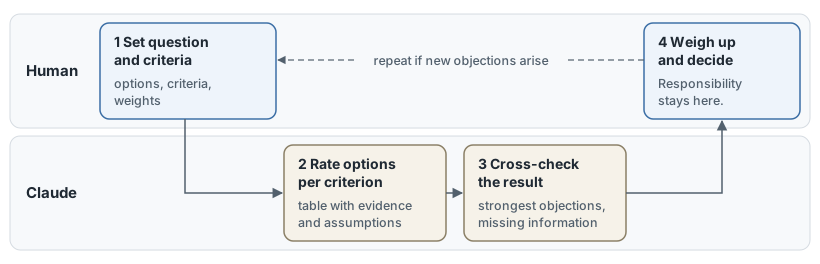
Figure 4: Division of labour in decision-making preparation. Claude evaluates and checks; the human sets the criteria and makes the decision.
- Criteria first: Without predefined criteria and weightings, Claude selects both itself, and the result cannot be verified.
- Withhold personal preference: Whoever names the preferred option is more likely to receive agreement than disagreement (7.1).
- Identify gaps: The assessment specifies the evidence or assumption for each cell and highlights where information is missing.
- Separate cross-checking: The task ‘Name the strongest objections to this recommendation’ works best in a new conversation that is only aware of the result.
- Increase the cognitive effort: For questions with far-reaching consequences it is worth investing more cognitive effort (2.2).
For the presentation, it is sufficient to request a side-by-side comparison. Claude provides this as a table or an interactive view.
3.4 Education: Learning and Teaching
Describes its use in education: learners have material explained to them and practise it, whilst teachers develop curricula and assess performance.
Anthropic has analysed how students and teachers at universities use Claude. The two reports were published in 2025 and are based on accounts with university email addresses.
| Role | Most common uses | Recommended working methods |
|---|---|---|
| Learners | Creating and improving learning materials, such as practice questions, summaries and text revision (39 per cent); explanations and solutions to exercises (34 per cent); analysing and presenting data (11 per cent) | Get explanations rather than solutions: request practice questions, have your own text assessed paragraph by paragraph, and work through the solution yourself. |
| Teachers | Developing curricula and course materials (57 per cent), conducting one’s own research (13 per cent), assessing performance (7 per cent) | Draw on one’s own subject expertise, design tasks that require independent thinking, and do not accept assessments without checking them first. |
Learning mode: Claude responds like a tutor, asking questions rather than providing the solution. This is described for Claude for Education, the university-wide subscription. Claude for Teachers is available free of charge to verified teaching staff at US schools.
Two risks: Two of the four usage patterns among students, which occur with roughly equal frequency, focus directly on the solution or the final result. Anthropic describes examples of this as concerning and raises questions regarding the development of critical thinking. In just under half of the conversations regarding assessment, teachers largely left the task to the model, even though 22 surveyed university teachers considered AI to be least suitable for this very purpose.
3.5 Academic Research
Covers literature reviews, data analysis and hypothesis formulation, as well as the methodological limitations of its use.
| Work step | Support | Limitation |
|---|---|---|
| Literature review | Research identifies and synthesises sources (3.1). Claude Science searches scientific literature via connectors, and a skill helps to find, verify and consolidate papers. | Sources may be fabricated or misrepresented (2.1). Each paper must be checked against the original. Licensed literature requires its own access details. |
| Hypotheses and experimental design | Claude develops hypotheses, refines the experimental design and methodology section, and identifies objections. | A plausible hypothesis is not substantiated. Only a literature review will reveal whether it is novel. |
| Data analysis | Claude writes and runs code, for example in Python; in Claude Science, also in R. Claude Science saves results as versioned artefacts with provenance records and offloads complex calculations to its own computing clusters. | The reviewer, a background verification agent, compares statements with the execution log but does not perform the calculations itself. It reduces errors but does not eliminate them. |
| Writing | Claude drafts manuscripts, grant applications and responses to peer reviews (4.2). | Responsibility for content and labelling lies with the authors. |
Claude Science is a standalone desktop application (beta, available from the Pro plan onwards; in Team and Enterprise plans subject to approval by the owner) for macOS, Windows and Linux. The files remain on your own computer. Each new folder, network destination and off-site calculation must be authorised individually. The application is not limited to the life sciences and is not intended for clinical or diagnostic purposes.
Methodological rule: Anthropic requires results to be verified before they are incorporated into research, publications or subsequent decisions. An evaluation can only be verified via code and log; it cannot be verified via a chat response, which may differ when repeated (1.1).
Chapter 4: Creation of content and research outputs
4.1 The creation process from idea to publication
Breaks down the creation of content into seven steps: idea, research, structure, draft, feedback, formatting and publication.
| Step | Contribution by Claude | The role of the human | Building block |
|---|---|---|---|
| 1 Idea | Suggest variations of topics, perspectives and titles | Define and select the objective and target audience | Chat |
| 2 Research | Search for, consolidate and collect evidence from sources | Check sources in their original form | Web search, research (3.1) |
| 3 Structure | Drafting an outline with a key message for each section | Defining the structure | Chat |
| 4 Draft | Writing the text based on the outline and source material | Incorporating your own views, examples and figures | Claude Docs (4.3) |
| 5 Feedback | Assess the draft from the readers’ perspective, identify gaps, and revise specifically | Decide on each change | Highlight the text passage and request a change, comment to @Claude |
| 6 Format adaptation | Convert the same content into a presentation, summary, article or animation | Check the tone for each channel | Slides, Design, Motion (4.3) |
| 7 Publication | Share via a link or export to a file format | Check facts, rights and labelling; approve | Share, Export (4.3) |
Working procedures
- Steps 4 and 5 are repeated until the draft is finalised. Each iteration specifies exactly what is to be changed (8.2).
- The entire workflow remains within a single project so that material, style guidelines and versions remain accessible (8.3).
- Those who regularly follow this process record it as a skill (9.1).
Labelling: The text of the current models bears an invisible, machine-readable watermark. This is copied along with the text and can survive individual edits. Generated image files are provided with a proof of origin in accordance with the C2PA standard. Anthropic has signed the Code of Practice relating to Article 50 of the EU AI Act and is thereby implementing its commitments.
4.2 Writing, Editing and Creative Texts
Covers drafting, proofreading and stylistic adaptation, as well as literary and promotional texts.
| Task | Assignment for Claude | Note |
|---|---|---|
| Draft | Specify the purpose, target audience, scope and key messages, and attach the source material | “A two-page briefing for the sales team on price, timetable and the three most common customer queries” is more specific than simply “a briefing” (example from Anthropic). |
| Proofreading | Separate the levels: first content and structure, then style, and finally spelling. Have findings listed before Claude rewrites them. | In Claude Docs, Claude edits precisely the highlighted section. |
| Style adaptation | Specify tone, target audience and length, and attach two to three of your own text samples as examples | Permanent style rules belong in a skill (9.1) or in the project instructions (8.3). Styles are no longer documented in the help pages. Anthropic assigns tone and format to the skills there. |
| Literary texts | Develop characters, plot variations, dialogues and scenes in a specified narrative voice; use Claude as a critical reader | Without specifications, the tone comes across as smooth and balanced. A distinctive voice requires text samples. |
| Advertising texts | Request headlines, subject lines and adverts in different versions for specified target groups and channels | Check factual claims and promises before use. |
Recognisability: Unedited texts give themselves away through a uniform structure, triplets and clichés. This can be countered by providing your own text samples, compiling a list of undesirable phrases and revising the text by hand.
Division of labour: Claude provides variations and proofreads in seconds. The message, tone and final version remain the responsibility of the author.
4.3 Output formats, design and animation
Presents the output formats that are produced as artefacts or files (documents, presentations, spreadsheets, small applications, designs, diagrams and animations), and notes that Claude does not generate photos or illustrations itself.
| Format | Produced as | Export and sharing | Availability |
|---|---|---|---|
| Document | Claude Docs: formatted text with tables and tabs, which multiple people and Claude can edit simultaneously | Word, PDF, Markdown, Google Docs | all plans |
| Presentation | Claude Slides: slides from notes, reports or the chat, directly editable and presentable | PowerPoint, PDF, Google Slides | all plans |
| Design | Claude Design: Designs, prototypes, one-pagers and landing pages on a single workspace, in your own design system (colours, fonts, building blocks) if required. The standalone site claude.ai/design will close on 14 December 2026. | ZIP, PDF, PowerPoint, HTML; handover to Claude Code | all pricing plans |
| Table and calculation | File from the code execution: Excel with working formulas, as well as Word, PowerPoint and PDF | Download | all pricing plans |
| Small application | Artefact: interactive tool or single-page website | Link | all pricing plans; save data and integrate apps from Pro onwards |
| Diagram | View in chat (3.2) or as part of a document; it does not update automatically there | Image, SVG, HTML | Beta |
| Dashboard | Artifact with continuously updated data (3.2) | Link | Beta, from Pro onwards, in Enterprise following approval by the owner |
| Animation | Claude Motion: explanatory pieces, animated diagrams and workflows from code; individual words, numbers and times can be specifically modified | MP4 | Beta, Team and Enterprise, in Enterprise following approval by the owner |
Artifact or file: An artifact is suitable if the result is to be further processed, shared or maintained collaboratively in Claude. A file is suitable if it is to be opened and used in Office programs. All artifacts are located in the ‘Artifacts’ section of the sidebar and require code execution to be enabled.
Sharing: Artefacts are private by default. A link for any recipient is available from the Pro plan onwards. In Team and Enterprise, artefacts remain within the organisation until administration permits external sharing. Permissions are tiered: view, comment, edit.
Limitations: Claude does not generate photos or illustrations (2.1). Claude Motion operates without a video model and therefore does not produce realistic footage.
Chapter 5: Software Development
5.1 Setting up and exploring existing codebases
Describes the configuration of Claude Code and shows how it analyses the structure and interrelationships of existing systems.
Claude Code operates as an agent within the project folder: it reads files, modifies them and executes commands, such as tests and Git (version control). Unlike assistants that can only see the file that is currently open, it has an overview of the entire project.
Set-up
| Interface | Feature | Prerequisites |
|---|---|---|
| Terminal (command line) | Offers the full range of functions. A single installation command is sufficient (0.2), after which claude launches in the project folder. |
Pro or higher; alternatively, an API account or cloud provider |
| IDE (VS Code, Cursor, JetBrains) | Displays changes as a comparison in the editor. | same as Terminal |
| Desktop app, ‘Code’ tab | Runs multiple sessions side by side and requires no separate installation. | paid plan |
| Web and mobile | The session runs in the cloud. This is suitable for long tasks and for repositories (code repositories with version history) that are not available locally. | paid plan; for Enterprise, depending on the seat type |
Permissions: New sessions in the terminal and in VS Code start in Auto mode. Claude then works without prompting, whilst a second model checks and pauses risky steps before execution, such as deployments to production. In manual mode, Claude prompts the user before almost every change, every shell command and every network access. In Plan mode, Claude reads files, executes commands to explore the code, makes no changes, and submits a plan for approval.
Onboarding: Claude reads the code itself at the start of each task. You only need to explain what isn’t in the repository.
- From overview to workflow: First ask about structure and architectural patterns, then about data models, then have it trace a workflow – for example, the login process from the user interface to the database.
- Use technical terminology: Questions phrased in the project’s terminology are more precise. Claude can create a glossary of these terms on request.
- Offloading searches: Claude delegates broad searches to a sub-agent (an auxiliary agent with its own context window), which simply reports back the result. In typed languages, a code intelligence plugin leads directly to the definition of a symbol.
- Saving results:
/initgenerates an initial CLAUDE.md file from the codebase. This records what Claude would otherwise have to determine anew in every session (5.3).
5.2 Modification and Quality Assurance
Shows how new features, bug fixes and refactoring (restructuring without changing behaviour) are validated through tests, automated code review and security checks.
Claude completes a task as soon as the result appears to be ready. Only an executable test that reports ‘pass’ or ‘fail’ enables it to find and rectify its own errors.
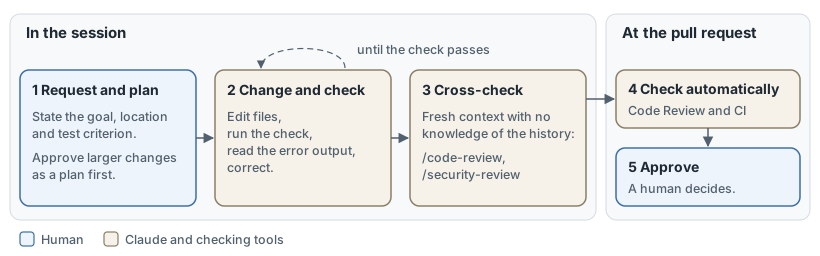
Figure 5: The path of a change from request to approval. Checks are carried out during the session and again at the pull request stage (the request to incorporate a change into the shared code).
Assignment by task
| Task | Request | Review |
|---|---|---|
| Bug fixing | State the symptom, suspected location and command to reproduce the issue. First, have a test written that demonstrates the bug. | The test passes after the correction. |
| New function | Refer to an existing pattern in the code and define the scope. For open requirements, Claude asks for clarification and draws up a specification. | Tests for normal and edge cases, review against the specification |
| Refactoring | Rewrite in small, individually testable steps and require the same behaviour. | The existing tests continue to pass. |
Testing tools
| Timing | Tool | Availability |
|---|---|---|
| During the change | Tests, type checking and linter (tool for style and error rules) for the project. The ‘security-guidance’ plugin allows Claude to check its own changes for common vulnerabilities. | Plugin from the Anthropic catalogue |
| Before the pull request | /code-review checks the change in a fresh context. /security-review checks the branch once for security vulnerabilities. |
/code-review available on all plans |
| If required | The “Claude Security” plugin uses multiple agents to scan a repository or a change, checks each finding independently and suggests corrections. | paid plan or API access |
| On the pull request | Code review: Several agents check the change; a further step filters out false positives, and the findings are displayed as comments on the line of code. | Team and Enterprise, GitHub only |
| Ongoing | Claude Security monitors repositories as a managed service. | Enterprise, Public Beta |
Rules
- Require proof: Display the command executed along with its output. The statement ‘all tests passed’ proves very little.
- Narrow down the review: Limit findings to correctness and exclude style. Anyone who implements every finding ends up with superfluous abstractions and tests for cases that never occur.
- Approval remains with the human: Code Review reads the code without executing it and does not approve any pull requests. A review with no findings does not prove the code is error-free.
- Reset rather than fix:
/rewindreverts the code and conversation to an earlier state. It does not revert files that have only been changed by a shell command. After two failed corrections, a new session with a more precise brief leads to the goal more quickly (8.2).
5.3 Teamwork and the toolchain
Explains how teams establish common rules, extend Claude Code and integrate it into CI (automated testing and deployment pipelines).
Claude Code recognises two types of specifications. An instruction is read by the model and is generally followed. A configuration is enforced by Claude Code itself, regardless of what the model decides.
Shared Rules
| Means | Content | Binding nature |
|---|---|---|
| CLAUDE.md in the repository | Knowledge not contained in the code: commands for testing and type checking, conventions, pitfalls. The file loads into every session and therefore remains short – as a guideline, under 200 lines. Further rules can be found at .claude/rules/ and are also loaded into every session. Rules marked with paths are loaded only when Claude reads or edits a relevant file. |
Instruction |
| Skills | Team workflows, such as releases or troubleshooting. Claude only loads their content when the task requires it (9.1). | Instruction |
| Hooks | User-defined actions that Claude executes in response to specific events, usually a shell command: format after each edit, reject changes in protected folders, only allow completion after a successful type check. | enforced, with limits |
| Prohibition rules and sandbox | Prohibitions apply in every mode, for example when reading files containing login credentials. The sandbox (isolated environment) restricts the file and network access of shell commands. On Windows, it is only available with WSL 2. | enforced |
| Managed settings | Organisational policies that no personal setting can override (11.1). | enforced |
Anything that allows no exceptions belongs in a hook or a prohibition rule; everything else goes in CLAUDE.md. The set of enforced rules remains small because each rule must be maintained and may occasionally be triggered incorrectly. Files in the repository apply to the whole team; personal guidelines are stored in CLAUDE.local.md or in your own user folder. If a repository already contains an AGENTS.md for other coding agents, Claude Code will read this as long as no CLAUDE.md is present.
Limitations of hooks
- Only two types are enforced: Hooks that execute a command or call a web service work reliably. Hooks of the types
promptandagentallow a model to decide and therefore remain a matter of discretion. - Errors are allowed to pass: If a hook fails, for example due to an incorrect path or a timeout, the action continues regardless. Only the setting
onFailure: "block"stops it. This setting is only available for hooks using a command or web service, and not for every event. It requires Claude Code version 2.1.295 or later. - Time limits terminate hooks: By default, hooks using a command, web service or MCP tool abort after 10 minutes; model queries after 30 seconds; and sub-agents after 60 seconds. Shorter time limits apply to individual events, such as 30 seconds when submitting a job. The
timeoutfield changes the value for each hook. - The process cannot be indefinitely delayed: after eight consecutive blocks by default, Claude Code will still terminate the task.
- Mods can override blocks: a mod (a plugin with its own program code) can authorise a call that was previously blocked by a hook or a restriction rule. This applies to computers without managed settings and without logging in via a Team or Enterprise plan. An organisation can specifically authorise mods to override restriction rules.
- Hooks themselves pose a risk: command hooks run with the full privileges of the user account. In interactive sessions, they only start once the folder has been confirmed as trustworthy. In scripted mode, this prompt is omitted; hooks from an external repository run there without prompting.
- The organisation takes precedence: individual users cannot disable centrally defined hooks. Administrators can block all other hooks (11.1).
Extension
- Integrating tools: Claude utilises existing command-line tools directly, such as
ghfor GitHub. Systems without such tools, such as ticketing systems or error monitoring, are integrated via an MCP server (8.4). - Defining sub-agents: A dedicated agent is provided only with the tools it needs, such as a reviewer with read-only access (9.2).
- Distributing as a plugin: A plugin bundles skills, sub-agents, hooks and MCP servers into a single installable unit. A marketplace (catalogue) distributes it, including internally (11.2).
Integration into the toolchain
| Method | Function |
|---|---|
| GitHub Actions, GitLab CI/CD | Claude Code runs within your own CI. On GitHub, it responds to @claude in issues and pull requests, implements changes and converts issues into pull requests. |
| Script operation | claude -p "task" runs once and then terminates. Tools are authorised in advance; an upper limit on steps or costs restricts the run. |
| Schedule and event | /loop repeats a job within the active session. Scheduled cloud tasks run without a dedicated computer (9.3). |
| Parallel sessions | Worktrees (separate working copies for each branch) prevent sessions from overwriting one another. |
Before every unattended run, five questions must be clarified: Does the run know its acceptance criteria? Can it check the result itself? What is it permitted to change? What stops it? Who approves the result?
Chapter 6: Operational Processes
6.1 Strategy, Positioning and Customer Acquisition
Covers everything from problem definition through to the offering and target audience, right up to customer acquisition.
| Step | Key question | Contribution by Claude | Human review |
|---|---|---|---|
| 1 Problem | What is the problem, who is affected, and how often does it occur? | Research the market and competition using sources (3.1); summarise customer feedback from interviews, enquiries and surveys (3.2) | Check the figures in the source |
| 2 Target group | Who is most affected by the problem, and who makes the purchasing decisions? | Create and describe segments based on your own customer data | Flag profiles without a data basis as assumptions |
| 3 Offering | What is being promised, and how does it differ from the competition? | Formulate variations of the value proposition; compare competitors against each criterion (3.3) | Seek out counter-arguments, as Claude tends to agree too readily (7.1) |
| 4 Marketing | Through which channels and with what content? | Plan a campaign with objectives, channels, an editorial plan and key performance indicators; draft content in line with the brand’s tone and check it against the style guide (4.2) | Check statements and rights before publication (4.1) |
| 5 Acquisition | Which customers, for what purpose, at what stage? | Research companies and contacts, prepare meetings, draft outreach messages, transfer meeting notes into follow-up actions and fields in the CRM (customer database), prepare open sales opportunities and forecasts | Read and send every message yourself |
Building blocks: Anthropic publishes plugins for this work, organised by role (9.1). ‘Marketing’ contains commands for campaign planning, brand analysis, competitor analysis and performance reporting. ‘Sales’ contains company research, meeting preparation, meeting summaries, review of open sales opportunities and forecasting. Both utilise web searches and proprietary material. ‘Sales’ accesses CRM, email and calendar systems via connectors, such as Salesforce or HubSpot, whilst ‘Marketing’ accesses services such as Canva, Figma and HubSpot (8.4). Recurring tasks, such as a morning briefing on the day’s appointments, run as scheduled tasks (9.3).
Limitations
- Assumptions remain assumptions: Claude provides market size, willingness to pay and prices as reasoned estimates. These are only validated by market testing.
- In-house knowledge is lacking: Claude’s understanding of customers and the market is based solely on the material it receives. The more complete your own data, the more robust the segments.
- Communication is regulated: promotional messages are subject to advertising and data protection laws. The responsibility for verification lies with the company (11.1).
6.2 Customer service and support
Describes how Claude responds to customer enquiries, drafts replies for staff and maintains the knowledge base.
Claude takes on three roles in customer service: it answers routine enquiries itself, prepares complex cases for staff, and transfers resolved cases to the knowledge base.
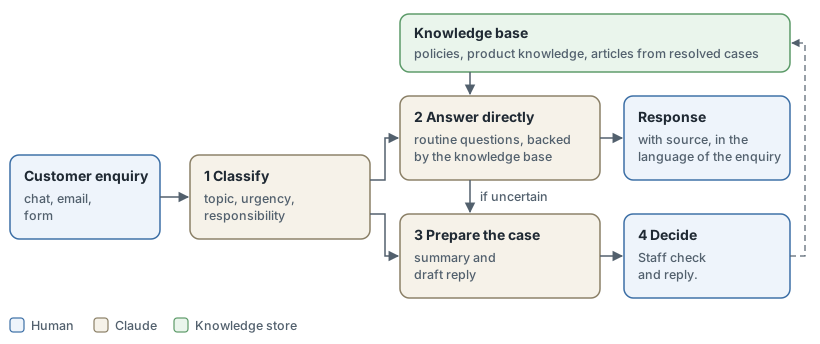
Figure 6: The customer enquiry workflow. Claude answers routine questions using the knowledge base; all other cases are prepared for staff. Resolved cases are transferred back as articles.
Two ways to use it
| Path | Function | Prerequisite |
|---|---|---|
| Assistant for the service team | The ‘Customer Support’ plugin sorts enquiries by category and urgency (/triage), searches for answers in the connected systems (/research), drafts the response (/draft-response), bundles a case for the technical team (/escalate) and writes help articles from resolved cases (/kb-article). |
Paid plan. Chat, Cowork or Claude Code. Connectors to the ticketing system, CRM and knowledge base |
| Dedicated customer channel | A chat system built via the API responds directly to customers, retrieves customer and order data, and carries out actions (10.2). | Development, testing and ongoing monitoring |
According to Anthropic, the solution is worthwhile for large volumes of similar enquiries, for round-the-clock support where required, during peak periods and for multilingual customer bases.
Anthropic’s benchmark figures for a customer chat
| Key metric | Benchmark |
|---|---|
| Correct identification of enquiries | at least 95% |
| Correct company and product details | 100% |
| Cases correctly escalated to humans | at least 95% |
| Enquiries resolved without human intervention | 70 to 80% |
| Customer satisfaction | at least 4 out of 5 |
Protection rules
- Disclose AI use: Anthropic’s Usage Policy (version valid from 12 November 2026) requires that a chat with customers be identifiable as AI at the start or within the interface.
- Respond only with verified information: Claude responds from the knowledge base and cites the source. If there is no basis for a response, it escalates the case (2.1).
- No commitments: Decisions on refunds, goodwill gestures and contract amendments are made by a human.
- Protecting data: Personal data appears in replies only where necessary and permissible.
- Staying on topic: The chatbot redirects questions outside its area of expertise; inputs are checked for misuse.
6.3 Office and Administration
Covers support for internal processes such as correspondence, scheduling, minutes and data maintenance.
Office and administrative tasks account for 8% of conversations on Claude.ai in the Anthropic Economic Index and 15% of usage via the programming interface (report from January 2026, sample from November 2025).
| Task | Support | Building block | Monitoring |
|---|---|---|---|
| Correspondence | Organise your inbox, summarise long threads on decisions and outstanding issues, draft replies in your own tone | Claude for Outlook (Beta, Pro and above), Gmail connector (all plans) | In Outlook, the reply is saved as an unsent draft. Via Gmail, Claude asks for confirmation before each send. |
| Scheduling | Find mutually available times, prepare invitations using the Outlook form, create and amend appointments via Google Calendar, prepare meetings with a brief briefing | Claude for Outlook, Google Calendar connector | Check invitations before sending |
| Minutes | Extract decisions, outstanding items and responsible parties from meeting transcripts or notes, draft a follow-up message | Chat, Claude Docs (4.3) | Cross-check decisions and names against the transcript |
| Data maintenance | Clean up and standardise lists, find duplicates, create tables with formulas | Code execution (3.2), Claude for Excel | Take samples, save a copy beforehand |
| Recurring tasks | Daily overview, weekly report, to-do list | Scheduled tasks (9.3). Use the ‘Productivity’ plugin for the to-do list | Monitor the first runs |
Draft before sending: By default, the user must confirm every action that Claude carries out on their behalf. In Team and Enterprise plans, the owner (organisation administrator) decides whether members may authorise individual actions without confirmation. For anything leaving the organisation, confirmation should remain mandatory.
Limitations
- Attachments and images: The Gmail connector only reads key data from attachments, not the content. From files in Google Drive, Claude only reads the text.
- Outlook: The add-in runs on the web, on Windows and on Mac with Microsoft 365. The mobile Outlook apps and self-hosted Exchange servers are excluded.
- Activation: In Team and Enterprise plans, the owner must approve connectors before individual users can connect to them.
Integration with Microsoft 365 and Google Workspace is covered in section 10.1.
6.4 Industry-specific use
Covers finance, law, healthcare, life sciences, public administration and charitable organisations, including their specialist offerings and requirements.
| Sector | Typical tasks | Specialist services |
|---|---|---|
| Finance | Presentations for transactions, credit proposals, portfolio reports, verification of actuarial tables in Excel and PowerPoint | Connectors to data providers such as LSEG, FactSet, S&P Global and Morningstar; agent templates for loan applications, customer due diligence (KYC) and fund accounting; dedicated offering for financial advisers |
| Legal | Check contracts against your own negotiation guidelines, with tracked changes in Word; review numerous contracts in tabular form; compare legal situations across countries; keep track of deadlines and mandates | Ready-made artefact templates, plugins and connectors to iManage, NetDocuments, Ironclad and Bloomberg Law |
| Healthcare | Review applications for cost coverage, prepare appeals against rejections, sort patient records | Connectors to coding and service databases (ICD-10, CMS, NPI) and PubMed; support for the FHIR data standard; infrastructure compliant with the US Health Insurance Portability and Accountability Act (HIPAA) |
| Life Sciences | Bioinformatics, literature reviews, study protocols, regulatory submissions | Claude Science (3.5); connectors to PubMed, bioRxiv, ClinicalTrials.gov and Benchling; Team plan for verified academic and non-profit research groups, free to start with, promotional price for 12 months |
| Public administration | Document review, research, drafting, case management, replacement of legacy software, public enquiries with handover to case officers | Claude for Government in an environment with US FedRAMP High security certification; access also via Amazon Bedrock and Google Cloud |
| Charities | Finding funding, writing applications and reports, planning campaigns, recruiting staff | Discounted Team and Enterprise plans; pre-installed ‘Claude for Nonprofits’ plugin; connectors to Blackbaud, Benevity and Candid |
Several services are tailored to the US: the health databases, HIPAA and FedRAMP. Claude Enterprise itself does not hold FedRAMP authorisation. Claude for Education is covered in 3.4.
Requirements for high-risk use: Anthropic’s Usage Policy (version valid from 12 November 2026) sets out two conditions whenever a recommendation from Claude concerns a person’s health, rights, finances, work, housing, education or access to services.
- Professional review: A qualified person must review the recommendation before it is passed on as advice or implemented as a decision. They may amend it and remain responsible. If the law requires a licence to practise, the person must hold one.
- Disclosure: The person concerned is informed that AI was involved.
| Area | Recommendations covered (selection) |
|---|---|
| Law and legal status | Advice on rights and obligations in individual cases, documents for signing or submission, outcomes of civil, administrative and arbitration proceedings, residence, asylum and citizenship status |
| Medicine | Diagnosis, treatment and dosage, interpretation of symptoms and test results |
| Finance, credit, insurance | Personal investment advice, tax advice, credit decisions, premium calculations, decisions on claims |
| Work, housing, education | Candidate selection and performance appraisal, tenancy and purchase applications, admission and examination assessment |
| Access to healthcare | Priority in triage and on waiting lists, admission to, refusal of or termination of treatment |
| Public benefits | Entitlement to benefits and the level of benefits |
Internal drafts, research and summaries are not covered, provided they do not themselves constitute the recommendation. Where permitted by law, the professional review is waived in the case of four decisions that are entirely in the person’s favour: payment of an insurance claim, approval of a medically prescribed benefit, authorisation for a healthcare service and approval of a public benefit. The policy completely prohibits decisions relating to criminal prosecution and the criminal justice system. It does not supersede local law: stricter provisions take precedence (11.1).
Chapter 7: Personal and everyday matters
7.1 Personal advice
Covers issues relating to health, career, relationships and finances, and specifies when professionals remain necessary.
In personal matters, Claude is suitable for helping to prepare a decision, not as the decision-making authority itself. According to an analysis by Anthropic (April 2026), around 6 per cent of conversations on Claude.ai seek personal advice – that is, an answer to the question of what the person themselves should do. Three-quarters of these advisory conversations fall into four categories.
| Area | Proportion | Meaningful tasks | Professionals remain necessary for |
|---|---|---|---|
| Health | 27% | Explaining medical findings and technical terms, compiling questions for a doctor’s appointment | Diagnosis, medication and dosage, acute symptoms |
| Work and career | 26% | Organising options, preparing applications and interviews | Employment contracts, termination, severance pay |
| Relationships | 12% | Organising one’s own perspective, preparing for a conversation, considering the other person’s viewpoint | Violence, separation with legal consequences, ongoing stress (7.2) |
| Finances | 11% | Explaining terms and products, calculating household budgets and options | Investments, credit, tax, over-indebtedness |
The percentages are based on around 38,000 consultations in March and April 2026. In the US, subscribers to the Pro, Max and Ultra plans can also link laboratory results and patient records (beta, announced in January 2026).
When experts remain necessary: According to Anthropic’s own statement, Claude is not designed to provide medical advice or professional care. Experts remain necessary as soon as one of three conditions applies:
- The answer depends on an examination or on documents that are not available to Claude.
- An error cannot be rectified, or can only be rectified at great expense (2.1).
- Someone must vouch for the advice, such as a doctor, a solicitor or a tax adviser.
Main risk: agreement. Claude is only familiar with the questioner’s account of the situation and tends to agree with them. The evaluation found this excessive agreement (sycophancy, 7.2) in 9 per cent of advice conversations, rising to 25 per cent in relationship-related queries. Where people contradicted Claude, it occurred twice as often (18 per cent compared with 9 per cent in conversations without contradiction). For the Opus 4.7 model, Anthropic reports half the rate of its predecessor in a stress test involving relationship issues.
Rules
- Present both sides: The prompt “How would the other person describe the incident?” balances out a one-sided account.
- Ask for objections: Asking for the strongest reasons against one’s own plan yields better results than simply seeking confirmation (3.3).
- Let the disagreement stand: Those who press the issue until Claude gives in will receive agreement, but not a better answer.
- Wording it yourself: Messages to partners or family should be in your own words. Anthropic found cases where people sent messages drafted by Claude without changing them and later regretted it.
- Protecting sensitive information: For details regarding health and finances, an incognito chat is recommended, as Claude does not save this in either the chat history or Memory (11.1).
7.2 Emotional support and its limits
Describes Claude as a conversation partner in stressful situations and identifies excessive agreement (sycophancy) and dependency as risks.
Claude can provide relief in stressful situations, but is no substitute for trusted individuals or specialist help. Anthropic makes it clear that Claude was not developed for emotional support and does not replace professional treatment.
Findings: In an analysis of around 4.5 million conversations from the Free and Pro plans (published in June 2025), 2.9 per cent were classified as affective, i.e. driven by an emotional or psychological need. Most of these relate to interpersonal advice and coaching. Claude acting as a companion and role-playing together account for less than 0.5 per cent. The mood expressed was slightly more positive at the end of the conversations than at the start. According to Anthropic, this does not prove any lasting benefit.
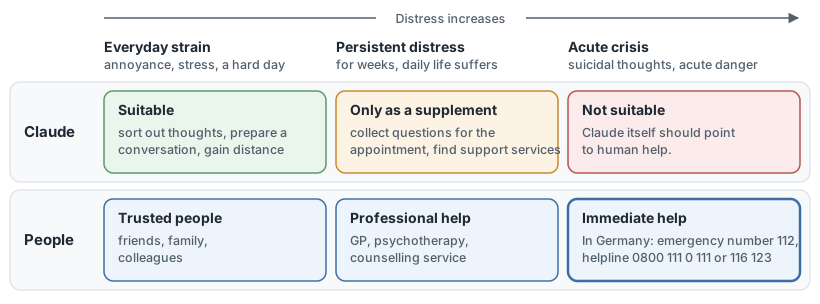
Figure 7: Levels of distress and appropriate support. The more severe the situation, the less effective Claude is and the more urgent human support becomes.
Two risks
| Risk | Mechanism | Findings from Anthropic |
|---|---|---|
| Excessive agreement (sycophancy) | Claude confirms the view expressed rather than questioning it, and is more likely to give in under pressure. | Claude disagrees in fewer than 10 per cent of supportive conversations. Affirmation is the most common route to distorted beliefs. |
| Dependence | Judgement and decision-making shift to Claude, which is always available and never tires. | Signs of strong dependence were evident in around 1 in 2,500 conversations, and signs of strong attachment in around 1 in 1,200 (December 2025). Long-term consequences have not been investigated. |
This is hardly noticeable in conversation. Users rated conversations in which their judgement or actions were at risk of being distorted above average. Ratings were below average in cases where they had recognisably acted on the advice given.
Warning signs
- Claude is regarded as the final authority, whose judgement no one checks any more.
- The day seems impossible to get through without Claude.
- Claude replaces conversations with people, rather than preparing them.
- Decisions and messages are adopted unchanged (7.1).
Countermeasures
- Demand a challenge: The prompt “Tell me where I’m wrong” counteracts blind agreement.
- Retain decision-making: Claude organises, whilst the person decides and formulates their own response.
- Review usage: The monthly review in the settings (beta; Free, Pro, Max and Ultra plans; only in the browser and desktop app, only with Memory enabled) shows the topics, the most active day, the peak hour and the number of conversations. Rest periods and break reminders are set separately in the settings.
- Be aware of crisis support: If Claude.ai detects signs of suicidal thoughts or self-harm, it displays support services for the relevant country. In Germany, the emergency number 112 and the TelefonSeelsorge telephone counselling service (0800 111 0 111, free of charge and available 24/7) are available.
Claude.ai requires users to be at least 18 years old. Anyone developing their own service that assesses or treats mental health conditions is subject to the requirements for high-risk use (6.4).
Part III: Working methods across application areas
Chapter 8: Managing the Quality of Outcomes
8.1 Structuring the Work Assignment
Explains the structure of prompts in terms of role, context, task, constraints and format, and demonstrates that they can be written, spoken or supplemented with images and files.
A good instruction explicitly states what is to be produced, for what purpose and in what form. Anthropic recommends, as a test, presenting the instruction to a colleague with no prior knowledge: if she does not understand it, neither will Claude.
| Building block | Key question | Example | Note |
|---|---|---|---|
| Role | From whose perspective does Claude work? | “You are reviewing as an editor at a specialist publishing house.” | One sentence is enough. In current models, a clear brief counts for more than the role. |
| Context | Who is the result for, and what is its purpose? | “The letter is addressed to customers without specialist knowledge and explains a price increase.” | Justifying a requirement helps: Claude applies it to similar cases. |
| Task | What exactly is to be produced? | “Write three versions of the subject line.” | Start with the action verb. Number several steps. |
| Restrictions | What are the limitations? | “No more than 150 words; use only details from the attached price list.” | State what should be included, rather than what shouldn’t. Allow for uncertainty: “Let us know if any details are missing.” |
| Format | In what format? | “As a table with the columns: Variant, Subject, Reason.” | An example is the most reliable way to guide the format and tone. |
Rules
- Ask for more if more is required: Claude delivers what the prompt specifies. Depth, completeness or variations must be explicitly requested.
- Use examples sparingly: one example is often sufficient. Anthropic recommends three to five different examples to prevent Claude from adopting the randomness of a single pattern.
- Long material first: extensive documents should be placed at the beginning, with the question at the end. Anthropic reports that this order yields up to 30 per cent better answers in tests. Furthermore, the prompt helps by citing the relevant sections first (2.1).
- Keep it short: A longer prompt is not necessarily better (8.2).
Input methods
| Method | Suitability | Limit |
|---|---|---|
| Writing | Precise prompts that can be checked and reused | |
| Speaking | The voice mode (beta, all plans) conducts the conversation verbally, for example for thinking aloud or whilst on the move. Switch between text and voice within the same conversation. | Fable is not available as an option here. Ask multi-part questions one at a time. |
| Images | Photos, screenshots and diagrams can be added to the prompt. | Claude has difficulty reading small or blurry images. Anthropic recommends a minimum resolution of 1,000 × 1,000 pixels. |
| Files | Documents and spreadsheets provide the material to which the prompt refers. | Formats and size limits are specified in section 3.2. |
8.2 Iteration and error diagnosis
Shows how results improve step by step and how typical errors in the prompt can be identified.
A poor result usually indicates a gap in the prompt. The quickest way to improve is for each iteration to address exactly one cause.
| Symptom | Probable cause | Correction |
|---|---|---|
| The answer remains too general. | The task specifies neither details nor requirements. | Add details and an example; explicitly request depth |
| The answer misses the mark. | The purpose and target audience are missing. | State what the result is needed for |
| The format varies. | The form is merely described. | Include a template |
| For large tasks, the result becomes unreliable. | A task requires too many steps at once. | Break down into sub-tasks, each of which accomplishes one thing (9.2) |
| Details are made up. | The material is missing, and Claude fills in the gap. | Include material, explicitly allow ‘I don’t know’, request evidence (2.1) |
| Claude suggests rather than implementing. | The task is phrased as a question. | “Change the paragraph” instead of “Can you suggest changes?” |
| Previous instructions are lost. | The conversation is long; older parts have been summarised (1.1). | Start a new conversation; include permanent information in the project instructions (8.3) |
Procedure
- Start simply: Begin with a concise, clear brief and only add to it if it noticeably improves the result.
- Give precise feedback: Specify what should stay the same and what needs to change, rather than simply demanding that it be ‘better’.
- Start afresh: After two unsuccessful rounds of corrections, a new discussion with a more precise brief will lead to the desired outcome more quickly. Otherwise, the process will continue to be influenced by previous failed attempts.
- Ask Claude: The question “What was unclear about my instruction? Rephrase it” often reveals the missing detail.
- Secure what works: An instruction that proves effective belongs in the project instructions (8.3) or in a skill (9.1).
- Measuring recurring tasks: Anyone who uses a task frequently or in a custom application should define success criteria and test cases, and check every change made to it (10.2).
8.3 Provision of working knowledge
Explains how projects, instructions, Memory and files determine what knowledge is available to the model, and how the context window limits its scope.
Claude only knows what is in the context window about a project (1.1). Several means provide knowledge to the context window, and they differ in their scope.
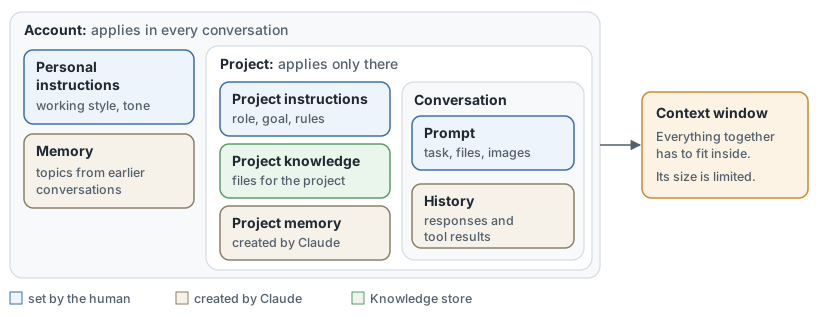
Figure 8: Scopes of working knowledge. What applies in the account affects every conversation; what is contained in the project applies only there.
| Means | Content | Note |
|---|---|---|
| Personal instructions | Working methods, personal terminology, typical tasks, tone | These apply to all conversations within the account. |
| Project instructions | Role, objective and rules of a project | Keep it concise: framework, key rules, role. |
| Project knowledge | Documents, data and code relating to the project | Up to 30 MB per file; the text is imported. In paid plans, when dealing with large volumes of data, Claude loads only the relevant excerpts (RAG) and can thus hold up to ten times the volume. |
| Memory | Role, people, preferences, ongoing work | Claude creates the entries itself or in response to the command ‘Remember this’. They can be viewed and edited. Claude only stores sensitive topics such as health or religion with consent. |
| Search in previous chats | Content from previous conversations on request | Paid plans. Within a project, Claude only searches that project’s conversations. |
Rules
- Conversations within a project are not linked to one another: the only thing they have in common is what is contained in the instructions, project knowledge, project memory or the account’s memory. Results that are to remain valid should be included in the project knowledge.
- Memory is not a set of rules: Claude decides for itself what to remember. Binding guidelines belong in the instructions.
- Switch it off where it gets in the way: Memory can be switched off for an individual conversation before the first message is sent. An incognito chat is also excluded from the history and search function (11.1). It is not available in projects.
- The organisation has a say: In Team and Enterprise, Memory is enabled by default for the organisation. The owner can disable it, in which case all members’ memories will be permanently deleted. In organisations created on or after 31 October 2026, Memory is enabled for every member from the outset. In older organisations, each member enables it themselves.
The context window as a boundary: All the elements mentioned share the space with the history, tools and the response being drafted (1.1). Three habits help keep it clear: keep project instructions concise, enable only the connectors you need (8.4) and start a new conversation for a new topic.
A new version of projects is being introduced as a beta for selected Pro, Max and Ultra subscribers, initially in Claude Code. There, a project is a single conversation, the work of which Claude distributes across parallel threads. A library collects the files.
8.4 Connecting to external data sources
Describes how connectors to services such as Google Drive, Gmail, Notion, Slack or GitHub make existing data usable and allow actions to be performed within these services.
A connector makes a service’s data accessible without uploading it and allows Claude to act within that service. Its scope is limited strictly to the permissions of the logged-in user: anything the user is not authorised to view within the service remains inaccessible to Claude. Shared access credentials (10.3) form an exception to this. In Google Drive, Claude searches for files; in Slack, it sends messages; and in the Linear task management system, it creates tasks. Connectors are available across all plans, in Chat, in Cowork, in the desktop app and in the mobile app.
In four steps
- Select: The Directory (Anthropic’s catalogue) lists the intended use as well as the read and write permissions for each connector.
- Connect: The user logs in to the service and confirms the requested permissions.
- Enable: The ‘+’ menu in the conversation determines which services Claude is permitted to use there.
- Use: Claude automatically draws on a connected service if it is relevant to the question.
Types
| Type | Feature | Note |
|---|---|---|
| Connector from the Directory | Listed by Anthropic, with its own page detailing capabilities and availability | Automatically verified by default; additionally verified by a human and labelled ‘Verified’ |
| Interactive connector | Displays interfaces such as dashboards or task boards directly within the conversation | Marked as ‘Interactive’ in the Directory |
| Custom connector | Connects to an MCP server via its web address (10.3) | Not tested by Anthropic. One is permitted on the Free plan. |
| Desktop extension | Runs locally within the desktop app | The entries in the Directory have been deprecated (1.2). |
Control
- Set action levels: Each connector’s capability has one of three levels: always allowed, approval required or blocked. In Team and Enterprise, the owner can set the levels for everyone, for example, allowing reading but blocking sending.
- Activation: In Team and Enterprise, the owner activates a connector, after which each member signs in themselves (6.3).
- Save space: Each connector takes up context. The ‘Auto’ default setting is suitable for most users. From around ten connectors onwards, the ‘On demand’ setting is worth using, whereby Claude only loads a service when it needs it.
- Note the data location: The connected service processes data on its own infrastructure and under its own terms and conditions. Changing Claude’s settings regarding the processing location does not alter this.
- Connect sparingly: Only connect services that are needed and that you trust. Write permissions carry greater weight than read permissions (11.1).
Chapter 9: Standardisation and Delegation
9.1 Reusable Work Instructions
Shows how prompt templates and skills define roles, rules, processes, examples and formats, and how plugins bundle them for sharing.
Anything that is repeated is recorded once: as a template, as a skill or bundled as a plugin. The three forms differ in terms of who triggers them and how far their scope extends.
| Form | Content | Effect | Suitable for |
|---|---|---|---|
| Prompt template | Task text with placeholders | The person inserts them or files them in the project instructions (8.3). | Individual, simple tasks |
| Skill | Folder containing instructions (SKILL.md), plus examples, templates and scripts as required |
Claude initially reads only the name and description and loads the rest as soon as a task matches. | Recurring processes with a fixed outcome |
| Plugin | A bundle of skills, connectors and commands; in Cowork and Claude Code, this also includes agents and hooks | It is installed as a single unit. Paid plans. | Sharing within the team (11.2) |
Structure of a skill
- Name and description: The description (maximum 200 characters) explains what the skill does and when it applies. Claude uses this to decide whether to invoke the skill.
- Instructions: These set out the role, rules and step-by-step procedure.
- Examples and format: Examples show the expected result; templates define its format.
- Scripts: These are optional and handle tasks that can be calculated.
Paths to the skill
| Path | Description |
|---|---|
| Ready to use | Skills from Anthropic generate Excel, Word, PowerPoint and PDF files. The Directory lists skills from partners such as Notion, Figma and Atlassian. |
| Writing | A guide written in Markdown is sufficient; no programming is required. |
| Recording | In Cowork on a Mac, Claude records your screen and voice for around 10 minutes and suggests a skill based on this (Pro, Max, Ultra and Team). |
Skills are available on all plans. They require code execution to be enabled. The format is an open standard that can also be adopted by other tools.
Rules
- One skill, one purpose: several specialised skills work more reliably than a single ‘jack-of-all-trades’ skill.
- Note the distinction: project knowledge is available to every conversation within the project, whereas a skill is only loaded when needed and applies universally.
- Testing: A new skill is tested using several different tasks.
- Check the source: A skill may contain program code and load further code. Its files must be read before activation, even if it originates from colleagues (11.1).
9.2 Multi-stage and agent-based processes
Describes how chained prompts and agents are designed, coordinated and extended to agents working in parallel, and identifies their performance limits.
Anthropic advises choosing the simplest solution and only adding stages if they demonstrably improve the outcome. Multi-stage processes come at the cost of time and money to achieve better results.
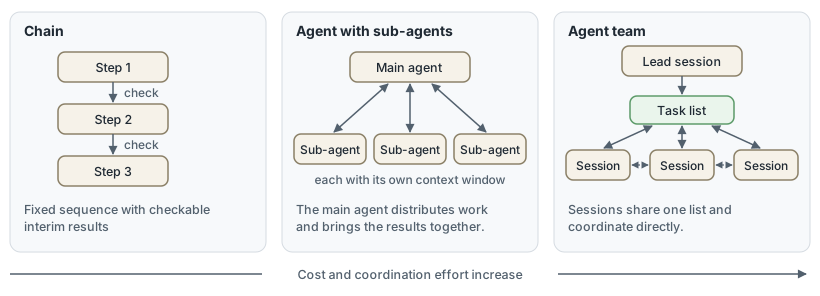
Figure 9: Three forms of multi-stage processes. From left to right, the degree of autonomy increases, and with it the effort required.
| Form | Working method | Suitable when | Price |
|---|---|---|---|
| Chain | Fixed sequence of tasks. Each processes the result of the previous one, with a check in between. | the task can be neatly broken down into fixed steps | Longer runtime |
| Agent | Claude determines steps and tools itself. | The number and type of steps are unpredictable | Higher costs. Errors can propagate. |
| Agent with sub-agents | The main agent distributes subtasks. Each sub-agent works in its own context window and reports back only the result. | Sub-tasks are independent or involve reviewing a large amount of material | Each sub-agent consumes additional tokens from the same quota. |
| Team of agents | Multiple sessions with a leader and a shared task list coordinate directly with one another. | Participants are required to exchange findings and review each other’s work | Significantly higher consumption. In Claude Code, this is experimental and disabled by default. |
In Chat and Cowork, Claude distributes such work itself. In Claude Code, sub-agents can be set up specifically (5.3).
Design
- Start with the chain: The most common pattern is to draft, check against criteria, and revise.
- Separate the evaluator: A separate step or sub-agent that merely reads the output assesses the result more independently than its creator.
- Define the scope: Each sub-agent receives a clear description and only the tools it needs.
- Limit delegation: Current models deploy sub-agents automatically, sometimes more frequently than necessary. The brief therefore specifies when they are appropriate: for parallel, mutually independent subtasks.
Performance limits
- Dependent work: For steps that build on one another, changes to the same file, and tasks with many dependencies, a single session works more effectively.
- Error propagation: An early error carries through to all subsequent steps. Anthropic recommends testing in an isolated environment and fixed guardrails (11.1).
- Trust: An agent runs through many steps without seeking confirmation. This presupposes that its result can be verified (2.1).
9.3 Recurring and long-running tasks
Covers schedules, repetitions and progress monitoring, as well as the benefits for personal work organisation.
A scheduled task is a saved instruction with a cycle. Claude executes it without further intervention and saves the result for review.
| Path | Interval | Execution | Note |
|---|---|---|---|
| Scheduled task in Cowork | Hourly, daily, weekly, on weekdays or on demand | In the cloud, even when the computer is switched off | Paid plans. Tasks that require local files or programs only run on your own computer. |
| Cloud task in Claude Code | Freely selectable, at least hourly | In the cloud, with a fresh copy of the repository | In auto-mode by default (5.1) |
| Desktop task in Claude Code | Freely selectable | On your own computer, which must be awake and have the app open | Access to local files |
/loop in Claude Code |
From one minute | In the open session | Ends with the session, after seven days at the latest |
Set-up: In Cowork, a single sentence specifying the task and frequency is sufficient, for example: “Every Monday at 9 am, summarise the previous week’s messages in my team’s channels”. Claude will ask for clarification, specify the name, schedule and content of the task, and schedule it once confirmed. The task uses the same connectors, skills and plugins as a standard session.
Benefits for work organisation: Anthropic cites typical uses such as daily briefings from messages, emails and appointments; weekly reports from connected sources; recurring research on topics or competitors; and organising files and status updates from project management tools.
Progress monitoring
- Overview: The ‘Scheduled’ view displays upcoming and past runs. Tasks can be modified, paused, resumed, deleted or executed immediately from there.
- Each run is a separate session: the result and work steps remain individually traceable.
- Long tasks: Cowork works on a task over a long period without the context window’s limit interrupting the run. The user describes the result and reviews it later.
Rules
- Defining the result: The task specifies the format, scope and storage location of the result so that runs can be compared.
- Checking initial runs: A new task initially runs on demand and only subsequently on a scheduled basis.
- Restricting permissions: Unsupervised runs are granted read-only access where possible. The approval mode is defined for each task (9.4).
- Clean-up: Tasks whose results are no longer being read are paused or deleted.
9.4 Working on the computer and in the browser
Shows how Claude works directly with files, programs and web pages via Cowork, Computer Use, Claude in Chrome and Claude Duet.
Claude interacts in four ways. The more directly it interacts with the screen, the slower, more error-prone and riskier the work becomes.
| Method | Activity | Availability | Special feature |
|---|---|---|---|
| Cowork | Carries out multi-step tasks with files, connectors and skills and delivers finished results | Paid plans. Desktop app, web and mobile. Web and mobile in Team as a beta, in Enterprise following approval by the owner | Sessions run in the cloud; in Team and Enterprise, they also run locally in the desktop app. Claude only deletes files with explicit permission. |
| Claude in Chrome | Reads webpages, clicks and fills in forms | Paid plans. Google Chrome only; not on mobile devices | The sidebar runs as a Cowork session. |
| Computer Use | Operates programs via screenshots, mouse clicks and keyboard | Beta. Pro, Max and Ultra. Desktop app for macOS and Windows; Claude Code in Terminal only on macOS | There is no isolation between Claude and the programs. Each program is authorised individually; trading and crypto platforms are blocked. |
| Claude Duet | Acts as a constantly available assistant on its own computer in the cloud and gets in touch on its own initiative | Research Preview with a waiting list. Pro, Max and Ultra, available in the USA only | Asks for confirmation before sending, paying, signing and deleting |
Order of tools: Cowork first selects a connector, then the browser, and only finally the screen control. Access via a connector takes seconds, whilst screen control takes considerably longer.
Approval modes in Cowork
| Mode | Behaviour |
|---|---|
| Manual | Claude pauses before actions and waits for confirmation. Default in Enterprise |
| Automatic | Claude carries on, checks every action for security and blocks anything it classifies as unsafe. Default in Pro, Max, Ultra and Team |
| No approvals | Claude does not ask for confirmation, and nothing checks the actions. Only to be used when there is complete trust in all sources involved |
Rules
- Choose the most precise method: If you use a service frequently, integrate it as a connector rather than operating it via the screen (8.4).
- What is visible is readable: When using the computer, Claude sees everything on the screen. Confidential windows must be closed beforehand. Programs for banking, healthcare and government agencies are not authorised.
- External content may contain instructions: Websites, emails and files may contain hidden commands (prompt injection). According to Anthropic’s own statement, the security checks are not foolproof (11.1).
- Supervision: Get started with familiar programs and under supervision. A session can be stopped at any time.
Chapter 10: Integration into applications and products
10.1 Claude in productivity applications
Describes working with Claude within Microsoft Office, Google Workspace, Slack and Microsoft Copilot.
Claude and the work application can be integrated in two ways: either an extension brings Claude into the application, or a connector brings the application into Claude (8.4). Both methods are available for Google Workspace.
| Environment | Offering | What it does | Availability |
|---|---|---|---|
| Microsoft 365 | Claude for Excel, PowerPoint, Word and Outlook (extensions) | Excel: read and write cells, formulas, pivot tables and charts. PowerPoint: create and edit slides within an existing template. Word: draft and revise documents with tracked changes. Outlook: organise your inbox, draft replies, find appointments | Paid plans. Outlook is in beta and requires one-off approval from the administrator. |
| Google Workspace | Connectors for Gmail, Calendar and Drive; Claude for Google Workspace (sidebar in Docs, Sheets and Slides) | Connectors: search for, read, draft emails and send them after asking for confirmation. Create, edit and delete appointments. Search for, share and move files in Drive (6.3). Sidebar: Claude reads the open file and edits it directly. | Connectors: all plans. Sidebar: Beta, paid plans |
| Slack | Claude Tag | Anyone who mentions @Claude in a channel assigns a task. Claude maintains a checklist in the thread and replies there, visible to everyone. |
Public Beta. Team and Enterprise. Billed on a pay-as-you-go basis via the organisation; channels do not require a separate licence per Slack user. Direct messages are routed via the user’s licence. |
| Microsoft Copilot | Claude models in Copilot, Researcher and Copilot Studio | The user selects Claude as the model within the Microsoft products. | Operated by Microsoft. Disabled by default in the EU, EFTA and the United Kingdom. A separate setting for Word, Excel and PowerPoint is enabled by default if the tenant (the organisation’s Microsoft 365 environment) was created after 25 March 2026 |
Special features
- Microsoft 365: The four add-ins can share their working context. What happens in Excel is subsequently recognised by Claude in PowerPoint. In Team and Enterprise, this setting is disabled by default. Skills and connectors can also be used there.
- Slack: Claude Tag is intended for work that the team views collectively. Personal work on individual files remains the domain of Cowork or Claude Code. The owner restricts the user group and spending.
- Microsoft Copilot: Anthropic acts here as a sub-processor for Microsoft. Microsoft’s contractual and data protection terms and conditions apply. The Claude models are currently located outside Microsoft’s EU data boundary. On 5 November 2026, Microsoft announced that it would bring processing for organisations in the EU and EFTA within the EU data boundary by the end of 2026. In the EU, EFTA and the United Kingdom, an administrator must manually enable the models. Only the separate settings for Word, Excel and PowerPoint are enabled by default in tenant accounts created after 25 March 2026.
Selection
| Situation | Suitable approach |
|---|---|
| The work takes place on an open file. | Extension within the application |
| Multiple sources contribute to a single result. | Claude with connectors |
| The team works together on a task. | Claude Tag in Slack |
| The organisation uses Microsoft’s contractual framework. | Claude models in Copilot |
The rule set out in 6.3 applies to sending: a human must check the draft before it leaves the organisation.
10.2 Programming Interface and Agent Development
Explains how to integrate your own software with Claude via the Messages API, Tool Use, the Agent SDK and Managed Agents.
Your own software integrates Claude via four building blocks. They differ in the extent to which Anthropic takes over the agent loop (the sequence of planning, acting and checking).
| Module | What it provides | Loop run by | Suitable for |
|---|---|---|---|
| Messages API | The core interface accepts messages and returns the model’s response. | Your own application | Individual calls and workflows with full control |
| Tool use | Claude requests that a function be called. Your own functions are executed by the application, whilst tools such as web searches and code execution are handled by Anthropic. | Your own application | Access to your own data and actions |
| Agent SDK | The library for Python and TypeScript provides tools, the agent loop and context management of Claude Code. | Your own process | Agents on your own infrastructure |
| Managed Agents | Anthropic runs the agent in an isolated cloud environment where it reads files, executes commands and uses the web. | Anthropic | Long-running and scheduled tasks. Beta |
Prerequisites: You’ll need an account on the Claude Console and an API key. Billing is based on tokens used, separate from app subscriptions (2.2).
Supplementary services
| Service | Purpose |
|---|---|
| Message Batches | Process large volumes on a delayed basis, at half price |
| Token Counting | Determine the size of a request before sending it |
| Files | Upload files once and use them across multiple calls |
| Skills | Create and manage your own skills (9.1) |
Rules
- Start small: A single, well-formulated prompt is often sufficient. Agents are only worthwhile when the steps are unpredictable (9.2).
- Describe tools precisely: Claude decides when to call a tool based on the description.
- Measure first, then refine: Success criteria and test cases come before working on the prompt (8.2).
- Consider data retention: Managed agents retain session histories until they are deleted and are therefore unsuitable for agreements that do not permit data retention (11.1).
- Operator obligations: Anyone offering a chat service to customers must disclose the use of AI (6.2). Additional requirements apply to recommendations in high-risk areas (6.4).
10.3 MCP and Deployment Methods
Explains your own MCP servers, which provide tools and data, and MCP clients, which utilise them; also covers custom connectors and the choice of procurement channel, either directly from Anthropic or via a cloud provider.
MCP (Model Context Protocol) is an open standard that connects AI applications to external systems, much like a universal plug. Once built, a server works with any application that supports the standard, including, alongside Claude, ChatGPT, Visual Studio Code and Cursor.
| Role | Task | Examples |
|---|---|---|
| MCP server | Provides tools (actions), data and pre-built workflows | A service provider’s server, or your own server connected to an internal database |
| MCP client | Connects to servers and calls their tools | Claude in Chat and Cowork, Claude Code, your own applications via the API’s MCP connector (Beta) |
Custom connectors
A custom connector connects to a remote MCP server via its web address (8.4).
- Accessibility: Claude accesses the server from Anthropic’s cloud, even if the user is using Cowork or the desktop app. The server must be accessible via the public internet. If it is located on a corporate network, Anthropic’s IP addresses must be allowed through the firewall.
- Login: The server usually requires login via OAuth (a method for granting access without sharing a password) or fixed login credentials. With fixed, shared login credentials, every user can access whatever these credentials can access.
- Organisation: In Team and Enterprise plans, the owner adds such a connector; in Enterprise, a member with the appropriate role can also do so. Afterwards, each member connects independently.
- Trust: Anthropic does not verify these servers. Connections are only established with servers originating from a trusted source (11.1).
Local MCP servers, which run as a program on your own computer, are used by Claude Code and the desktop app. They are not available in the browser or on mobile devices; in Cowork, they are only available as part of a plugin.
Procurement channels
| Option | Operator | Feature |
|---|---|---|
| Claude API | Anthropic | New models and features first; billing and support provided by Anthropic |
| Claude Platform on AWS | Anthropic, via the AWS account | Billing via AWS |
| Amazon Bedrock | AWS | Integrated into AWS billing and rights management |
| Claude Models on Google Cloud | Google or Anthropic, depending on the variant | Integrated into Google Cloud |
| Microsoft Foundry | Via Azure. Anthropic operates the service in both variants, either on Azure’s infrastructure or on its own | In the Azure variant, inputs and responses remain within Azure. Some features are missing. |
The range of features varies depending on the platform. Managed Agents are available via the Claude API, the Claude Platform on AWS and the Anthropic-operated version on Google Cloud. Anthropic recommends the direct approach for new projects and the full range of features, and the cloud provider for existing contracts, specific compliance requirements and consolidated billing. Before making a decision, it is important to check whether every required feature is available via the chosen approach.
Chapter 11: Responsibility and Organisation
11.1 Data Protection, Administration and Risks Associated with Agents Acting Independently
Covers data protection, access rights, retention periods and audit trails, as well as safeguards for agents acting autonomously.
Three questions determine responsible use: What happens to the data, who is authorised to do what, and how is an acting agent restricted?
Data Protection
| Question | Individual plans (Free, Pro, Max, Ultra) | Team, Enterprise and API |
|---|---|---|
| Model training | When the model improvement setting is enabled, for conversations flagged for security review, and following explicit consent elsewhere. Incognito chats remain exempt even when this setting is enabled. | Not enabled by default |
| Deletion | A deleted conversation disappears immediately from the history and from the systems within 30 days. | API: Inputs and outputs are deleted within 30 days. Uploaded files and sessions from Managed Agents remain until they are deleted. In the apps, the organisation’s retention policy applies. |
| Extended storage | Where use for training is permitted, data is retained for up to 5 years in de-identified form. | For the API, a ‘zero data retention’ agreement can be requested. This does not cover every feature or every model; Fable, for example, is not included. |
The following applies to all plans: Anthropic stores feedback via the thumbs buttons, along with the conversation, for up to 5 years and may use it for training. Content flagged as a breach of the Usage Policy remains stored for up to 2 years, whilst security check classification scores are retained for up to 7 years. Incognito chats are retained for 30 days by default and appear in the owner’s data exports for Team and Enterprise plans. Raw data from connectors is not used for training. Connected services process data in accordance with their own terms and conditions (8.4). The organisation itself is responsible for verifying whether compliance with the GDPR is sufficient.
Administration
| Means | Purpose | Plan |
|---|---|---|
| Centralised login (SSO), automatic account management (SCIM) | Centrally assign and revoke accounts | SSO from the Team plan onwards, SCIM in Enterprise |
| Roles and permissions | Define who is permitted to use and share functions | Enterprise |
| Permissions per function | Connectors (8.4), Memory (8.3), Skills and Plugins (11.2), Cowork and Claude in Chrome (9.4) | Team and Enterprise |
| Retention rules | Set the retention period for conversations and files | Enterprise |
| Audit trail | Audit logs and the Compliance API record activities. Events from Cowork can be forwarded to your own monitoring system. | Enterprise, monitoring of Cowork from the Team plan onwards |
The managed settings (5.3) also apply to Claude Code.
Risks posed by active agents
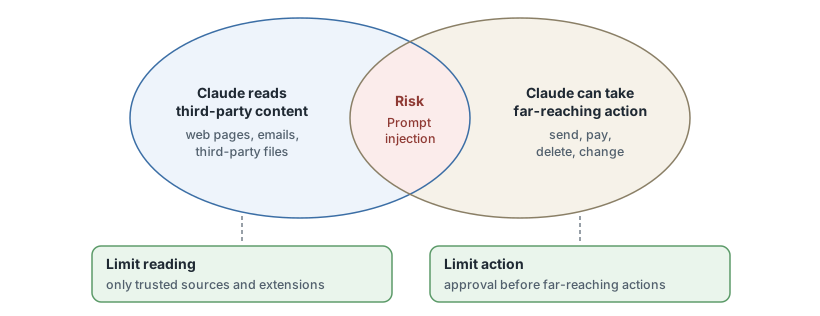
Figure 10: Two conditions for a successful attack via third-party content. If either is missing, the attack becomes difficult.
The greatest risk is prompt injection: instructions hidden within third-party content cause Claude to perform an unintended action. According to Anthropic, such an attack requires both conditions to be met simultaneously.
- Establish a trust boundary: Define which sources are considered safe, and do not grant Claude write access to anything else.
- Restrict permissions: A dedicated working folder with a backup copy replaces access to all files.
- Confirm actions with significant consequences: Sending, paying and deleting remain subject to approval (9.4).
- Limit unattended operations: Scheduled tasks must not handle confidential data or perform actions that are difficult to reverse. Their results are checked after each run (9.3).
- Check extensions: Skills, plugins and MCP servers must only come from trusted sources (9.1, 10.3).
Anthropic trains the models to defend against such attacks and checks incoming content and outgoing actions. For Claude in Chrome, it cites a success rate for known attacks of less than 0.08 per cent in its own tests of the entire protection configuration using the Opus 4.8 model, whilst emphasising that the risk is not zero.
11.2 Collaboration, Distribution and Maintenance of Shared Resources
Describes how teams share, organise and archive results and projects, and how skills are released within the organisation or submitted as plugins to the Directory.
Working collaboratively with Claude requires three things: shared results, shared workspaces and shared procedures. There is a separate tool for each, with its own set of permissions.
| Subject | Path | Permissions and restrictions |
|---|---|---|
| Conversation | A link shows a snapshot. Subsequent messages remain private. | In Team and Enterprise, only within the organisation. Attached files and raw data from connectors are not included. |
| Project | Sharing with individual users or the entire organisation | Team and Enterprise. Two levels: view or edit. The owner can disable sharing. Connectors only work in private projects. |
| Skill | Share with individuals; in Enterprise, also with groups. Publish to the organisation’s library | Shared skills are read-only. Changes will be reflected for recipients the next time the skill is used. The organisation may require a review prior to publication. |
| Plugin | The owner specifies the following for each plugin: not available, available for installation, installed by default, or mandatory. | Team and Enterprise. Custom catalogues (Marketplaces) are synchronised from a repository on GitHub or GitLab. |
| Entry in the directory | Submission via the developer portal | Paid plan; in Team and Enterprise, submitted by the owner. Anthropic automatically reviews every version, with new plugins additionally reviewed by a human. |
Organising and archiving
- Assign: Individual conversations can be moved to a project at a later date.
- Highlight: A star keeps important projects within easy reach.
- Archive: An archived project remains viewable and retains its members and permissions. It can only be deleted after it has been restored.
- Revoke access: Archiving does not revoke access. To do this, members must be removed in the sharing settings.
Maintaining shared assets
- Assigning responsibility: Every shared project and every published skill has a designated person in charge.
- Managing versions: Plugins from a repository carry their version history with them. Bugs are fixed there and the plugins are resynchronised.
- Pruning the collection: Outdated files in the project knowledge base take up space in the context window and lead to incorrect answers (8.3).
- Review shared links: In individual plans, the ‘Shared chats’ setting lists all shared links and allows you to remove them if desired.
- Note departures: Access to shared skills automatically ends when a user leaves the organisation.
11.3 Skills development and outlook
Outlines a step-by-step learning path from the basics to advanced use and identifies foreseeable product changes.
Using Claude can be learnt in four stages. Each stage adds a new skill whilst also requiring more scrutiny.
| Level | Skills | Chapter | Free courses from Anthropic |
|---|---|---|---|
| 1 Basics | Understanding how it works and its limitations, clarifying tasks, verifying results | 1, 2, 8.1, 8.2 | “Claude 101”, “AI capabilities and limitations”, ‘AI Fluency: Framework and foundations’ |
| 2 Specialist application | Using Claude in your own field, providing knowledge, integrating services | 3 to 7, 8.3, 8.4 | ‘AI Fluency’ for teachers, students, non-profit organisations and small businesses |
| 3 Continuity | Documenting workflows as skills, planning tasks, handing over work to Cowork | 9 | ‘Introduction to agent skills’, ‘Introduction to Claude Cowork’ |
| 4 Development and operation | Working with Claude Code, integrating Claude into your own software, managing and securing its use | 5, 10, 11 | ‘Claude Code 101’, ‘Building with the Claude API’, MCP courses |
The courses are available on the Claude Academy (academy.claude.com) and are free of charge. You can start them without an account. You only need to register if you wish to save your progress.
Four competencies: Anthropic’s course summarises the skilful use of AI in four terms, based on a framework by Rick Dakan and Joseph Feller.
| Competence | Meaning | In the document |
|---|---|---|
| Delegation | Deciding whether and how to use AI for a task | 2.1, 9.2 |
| Description | Describing objectives in such a way as to produce useful results | 8.1 |
| Discernment | Accurately assessing the results and behaviour of AI | 2.1, 8.2 |
| Diligence | Taking responsibility for the use of AI and its consequences | 11.1 |
Duty of competence: Article 4 of the EU AI Act has applied since 2 February 2025. In its amended form, it requires providers and deployers of AI systems to implement measures that support the development of their staff’s AI competence. They are not required to guarantee a specific level of competence.
Foreseeable changes
| Change | Status as of November 2026 | Consequence |
|---|---|---|
| Chat and Cowork are merging. | Roll-out in Pro, Max and Ultra; beta in Team; available in Enterprise following activation | Approval modes and scheduled tasks are available in every conversation (9.3, 9.4). |
| Projects are getting a revamp. | Beta for selected Pro, Max and Ultra subscribers, initially in Claude Code | A project becomes a conversation with parallel work streams (8.3). |
| Claude Duet | Research Preview in the US; Team and Enterprise announced | An assistant that takes the initiative (9.4) |
| Model change | Sonnet 4.5 will be discontinued on 30 November 2026. Older models that are still selectable will follow: Opus 4.5 on 24 November 2026 at the earliest, Opus 4.6 and Sonnet 4.6 in February 2027 at the earliest. The latest generation will run until at least September 2027. | Custom applications require a plan for the model change (10.2). |
| Desktop extensions | Entries in the directory have been deprecated | Users of such extensions should consider replacing them with connectors or plugins (8.4). |
Pricing, availability and designations such as ‘Beta’ in this document reflect the status as at November 2026. These should be checked in the source before making a decision. The principles set out in Part I are more durable: operating principle, limits of reliability and verification of results.
Chapter 0: Getting Started
0.1 Access, Account and Pricing Plan
Explains where to find Claude, how to set up an account and payment, and what the free plan offers.
One account applies to all access points: the browser, desktop app and mobile app all display the same conversations. Getting started is free.
Access methods
| Access | Where to find it and how to set it up | Prerequisites |
|---|---|---|
| Browser | Visit claude.ai, no installation required | Account |
| Desktop app for macOS | claude.ai/download, open the file, launch from the ‘Applications’ folder | macOS version 13 or later |
| Desktop app for Windows | claude.ai/download, run the installation file, launch via the Start menu | Windows version 10 and later, versions for x64 and ARM64 |
| Desktop app for Linux (Beta) | Set up the Anthropic package repository, then sudo apt install claude-desktop; the commands can be found in the Claude Code documentation on the ‘Claude Desktop on Linux’ page |
Ubuntu 22.04 or later, or Debian 12 or later |
| Mobile app | App Store (iOS) or Google Play (Android) | Account |
A browser is all you need for the chat; in paid plans, this also applies to Cowork. The desktop app comes into play as soon as you want Claude to run on your own computer: working with local files in Cowork, using desktop extensions, or using Claude Code without a terminal (0.2).
Registration
- Sign up: On claude.ai or in an app, enter your email address or choose to sign up using your Google account.
- Confirm: Open the sign-up link from the email. There is no password; any subsequent logins will be via the link or Google.
- Verify: Enter your mobile number and the six-digit code from the text message.
You must be at least 18 years old, be based in a supported country (2.2) and have a mobile number from such a country. Landlines and internet telephony are not accepted. The number cannot be changed later and can be used to verify a maximum of three accounts.
Free plan (Free)
- Included: Chat with the Sonnet and Haiku model series, web search, file creation, artefacts, Memory, connectors, skills and up to five projects.
- Not included: Claude Code, Cowork, Research and the Opus and Fable model series (2.2).
- Limit: The quota is reset every five hours. Anthropic does not specify a fixed number of messages. The limit varies depending on system load and decreases during long conversations and when handling large files. Claude will notify you when the limit has been reached.
Paid plan
You can switch plans in the settings under ‘Billing’ or directly at claude.ai/upgrade: select a plan and enter your payment details. Pro and Team plans can be paid for monthly or annually; Max and Ultra plans are available on a monthly basis only.
| Point | Rule |
|---|---|
| Payment methods | On the web, Anthropic only accepts credit and debit cards. Those who sign up via the mobile app pay via the App Store or Google Play and manage their subscription there. |
| Price | Pro costs 20 USD per month. The price is displayed in local currency where Anthropic supports it, with or excluding tax depending on the region. A comparison of all plans can be found in section 2.2. |
| Term | The subscription renews automatically for one month or one year and can be cancelled at any time. Invoices can also be found under ‘Billing’. |
| API | The API is billed separately via the Claude Console on a pay-as-you-go basis (10.2). Max, Ultra and Team include a monthly credit balance which must be used and expires at the end of the billing period (2.2). |
The Free plan is sufficient for trying it out. A paid plan is worthwhile as soon as the limit disrupts your work or you need Claude Code and Cowork.
0.2 Installing Claude Code
Lists the requirements for Claude Code, describes the installation process on macOS, Windows and Linux, and shows how the running Claude application assists with this.
Claude Code is available in two ways: pre-installed in the ‘Code’ tab of the desktop app, or as the command claude in the terminal (the command line). The first method requires no separate installation, whilst the second offers the full range of features (5.1).
Prerequisites
| Prerequisite | Rule |
|---|---|
| Plan | Pro, Max, Ultra, Team or Enterprise; alternatively, an account with the Claude Console or a cloud provider offering pay-as-you-go billing. The Free plan is not sufficient. |
| Operating system | macOS 13 or later, Windows 10 or later (version 1809), Ubuntu 20.04 or later, Debian 10 or later, or Alpine 3.19 or later |
| Computer | 4 GB RAM, x64 or ARM64 processor, internet connection |
| Git (version control) | Git is not mandatory. On Windows, Anthropic recommends ‘Git for Windows’ (git-scm.com), as Claude Code then uses the Bash shell instead of PowerShell. Git is required for separate working copies of parallel sessions (worktrees) and for uploading local projects to cloud sessions. Most Macs come with Git pre-installed; you can check this with git --version. |
| Node.js | Node.js is not required. Only the alternative method via npm requires it, from version 22 onwards. |
Method 1: Desktop app. Install the app and log in (0.1), open the ‘Code’ tab, select a project folder and enter your task. If the app prompts you to upgrade, you do not have a paid subscription.
Method 2: Terminal
| System | Open Terminal | Alternative to the installation command |
|---|---|---|
| macOS | Cmd + Space, type ‘Terminal’ | brew install --cask claude-code |
| Windows | Win + X, then ‘Terminal’ or ‘Windows PowerShell’ | winget install Anthropic.ClaudeCode |
| Linux and WSL (Linux on Windows) | Linux: usually Ctrl + Alt + T. WSL: open the installed Linux distribution | Repositories for apt, dnf and apk |
The recommended installation command for macOS, Linux and WSL:
curl -fsSL https://claude.ai/install.sh | bashThe command for Windows PowerShell:
irm https://claude.ai/install.ps1 | iexThis is followed by three steps:
- Check: Open a new terminal window.
claude --versiondisplays the version number;claude doctorprovides a diagnostic report on the installation. - Start: Navigate to the project folder and enter
claude. - Log in: The first session opens the browser to log in with your Claude account.
Four tips to save you the trouble of troubleshooting:
- No progress visible: The installation command does not display anything whilst loading. The window remains open until the success message appears.
- Windows: Administrator rights are not required. You can recognise PowerShell by the
PSbefore the path. The older Command Prompt (CMD) requires a different command. - Updates: The recommended installation updates itself automatically. With Homebrew, WinGet and the Linux package repositories, you can update manually.
- Billing: If an API key is stored on the computer in the variable
ANTHROPIC_API_KEY, Claude Code can bill usage through it on a pay-as-you-go basis rather than via a subscription.
Claude as an installation assistant
- In the chat, even with the free version: Claude guides you through the steps, explains each command and interprets error messages. It cannot execute anything on your computer: you must copy the commands into the terminal yourself and copy error messages verbatim back into the chat.
- Task for this: “I’m using Windows 11 and have never used a terminal before. Guide me step by step through the installation of Claude Code, following the official instructions (code.claude.com/docs/en/setup). For each step, state a command and wait for my feedback.” The reference to the instructions is important because commands change and training knowledge becomes outdated (1.1).
- In the ‘Code’ tab, with a paid subscription: There, Claude executes commands directly on the computer. For example, it uses
git --versionto check whether Git is installed and, on request, sets up any missing components, including theclaudecommand for the terminal. In the event of Git errors, Anthropic itself refers users to the help provided by Claude in Cowork. - For beginners: Anthropic provides a guide for people with no terminal experience (code.claude.com/docs/en/terminal-guide).